How To Install MilVus DB
Table Of Contents:
- Overview Of MilVus Development Options.
- MilVus Lite.
- MilVus Standalone.
- MilVus Distributed.
- Comparisons On Data Handling Capacity.
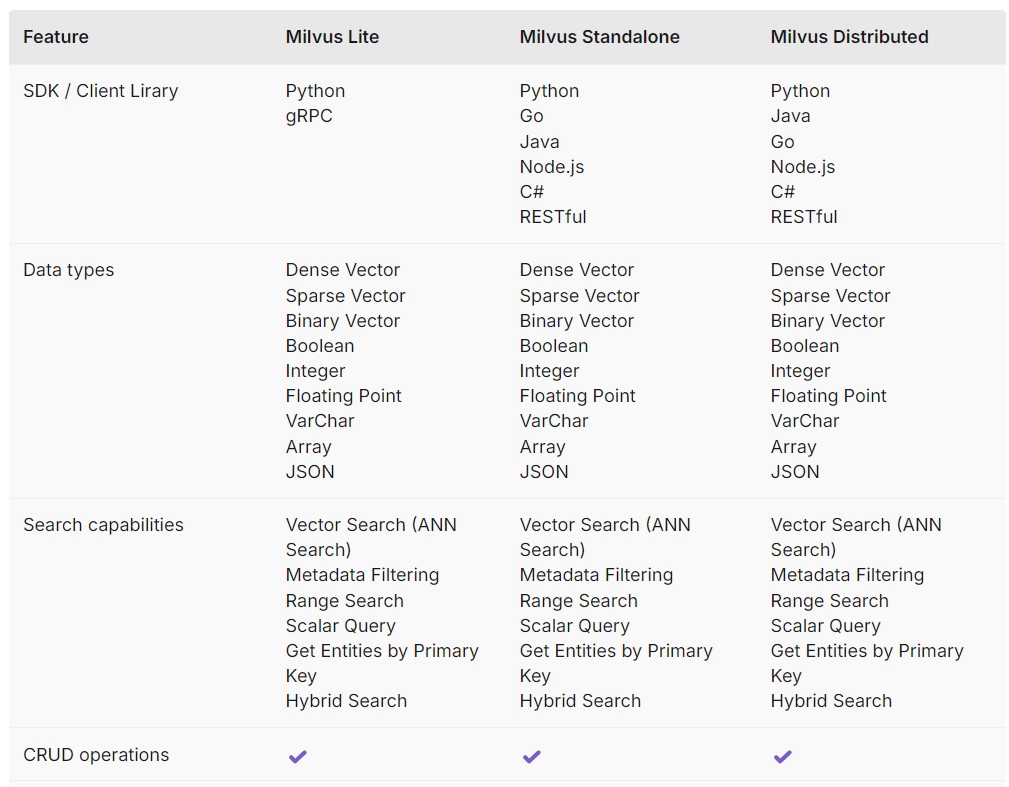
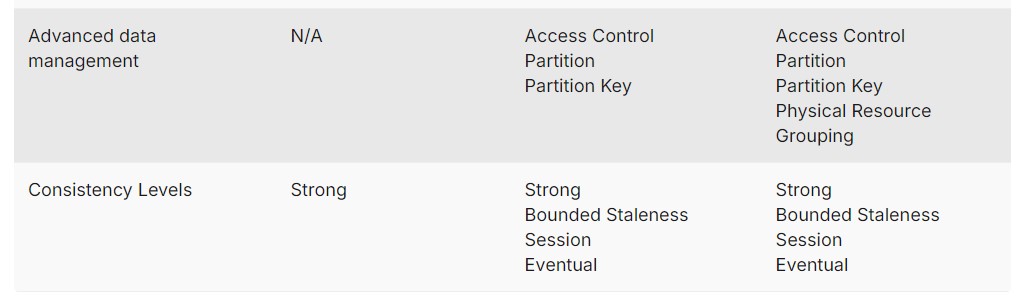
- Comparisons On Functionalities.
(1) Overview Of MilVus Development Options.
- Milvus is a highly performant, scalable vector database. It supports use cases of a wide range of sizes, from demos running locally in Jupyter Notebooks to massive-scale Kubernetes clusters handling tens of billions of vectors.
- Currently, there are three Milvus deployment options:
- Milvus Lite,
- Milvus Standalone,
- Milvus Distributed.
(2) MilVus Lite.
Milvus Lite is a Python library that can be imported into your applications.
As a lightweight version of Milvus, it is ideal for quick prototyping in Jupyter Notebooks or running on smart devices with limited resources.
Milvus Lite supports the same APIs as other Milvus deployments.
The client-side code interacting with Milvus Lite can also work with Milvus instances in other deployment modes.
To integrate Milvus Lite into your applications, run
pip install pymilvusto install it and use theMilvusClient("./demo.db")statement to instantiate a vector database with a local file that persists all your data.For more details, refer to Run Milvus Lite.
(3) MilVus Standalone
- Milvus Standalone is a single-machine server deployment.
- All components of Milvus Standalone are packed into a single Docker image, making deployment convenient.
- If you have a production workload but prefer not to use Kubernetes, running Milvus Standalone on a single machine with sufficient memory is a good option.
- Additionally, Milvus Standalone supports high availability through master-slave replication.
Dis-advantages Of MilVus Standalone
Resource Limitations: The server’s performance and capacity are limited to the resources available on the single machine, such as CPU, memory, storage, and network bandwidth.
Scalability Challenges: Scaling the server’s capacity to handle increased traffic or load can be more challenging in a single machine deployment, as you are limited by the resources of that single server.
High Availability Concerns: If the single machine experiences any downtime or failure, the entire server application becomes unavailable, potentially impacting the service or application’s overall reliability and uptime.
(4) MilVus Distributed
- Milvus Distributed can be deployed on Kubernetes clusters.
- This deployment features a cloud-native architecture, where ingestion load and search queries are separately handled by isolated nodes, allowing redundancy for critical components.
- It offers the highest scalability and availability, as well as the flexibility in customizing the allocated resources in each component.
- Milvus Distributed is the top choice for enterprise users running large-scale vector search systems in production.
(5) Comparisons On Data Handling Capacity
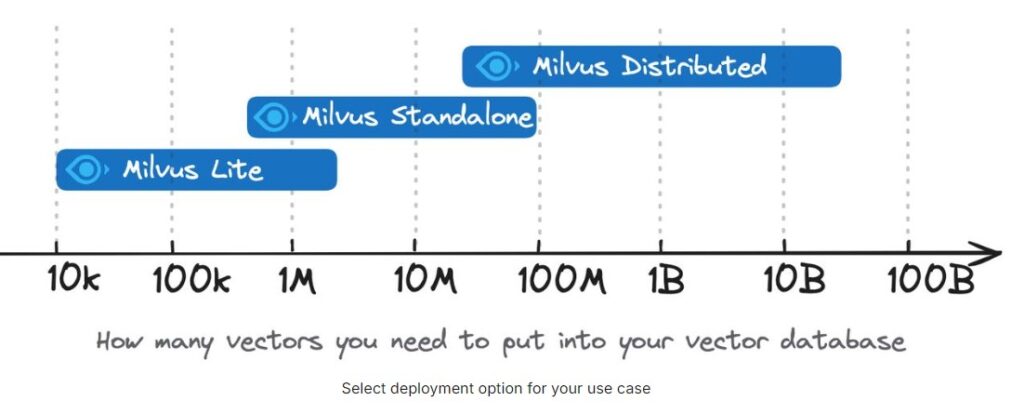
- Milvus Lite is recommended for smaller datasets, up to a few million vectors.
- Milvus Standalone is suitable for medium-sized datasets, scaling up to 100 million vectors.
- Milvus Distributed is designed for large-scale deployments and is capable of handling datasets from 100 million up to tens of billions of vectors.
(6) Comparisons On Functionalities