
Adding Use Case To A Category
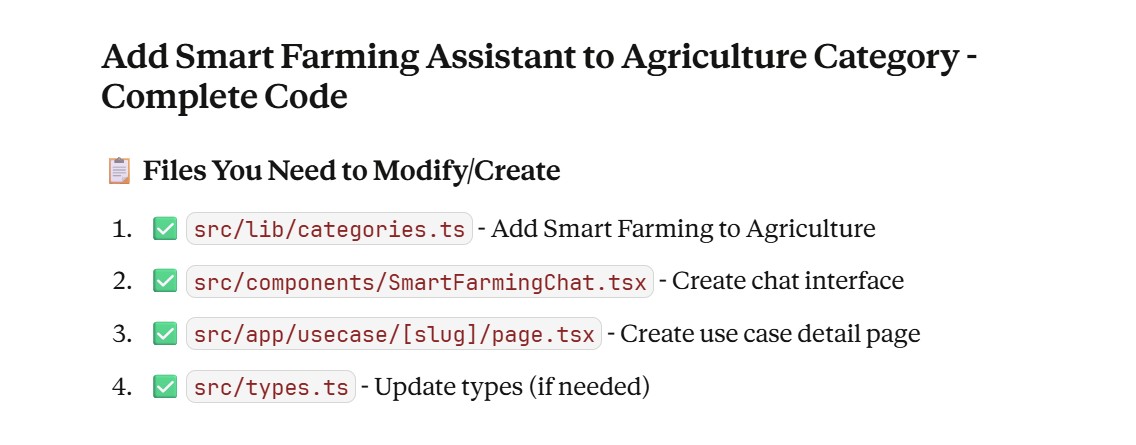

import { Category } from '@/types';

export const categories: Category[] = [
  // ... other categories ...

  {
    id: '9',
    name: 'Agriculture',
    slug: 'agriculture',
    description: 'AI for crop monitoring, yield prediction, and smart farming',
    icon: '🌾',
    color: '#84cc16',
    useCases: [
      {
        id: 'ag-1',
        name: 'Smart Farming Assistant',
        slug: 'smart-farming-assistant',  // ← Add slug
        description: 'AI-powered chatbot that helps farmers with crop advice, season information, and farming techniques using voice and text interactions',
        codeLink: 'https://github.com/yourusername/smart-farming-assistant',
      },
      {
        id: 'ag-2',
        name: 'Crop Yield Prediction',
        slug: 'crop-yield-prediction',
        description: 'Predict crop yields based on weather patterns, soil conditions, and historical data',
      },
      {
        id: 'ag-3',
        name: 'Pest Detection System',
        slug: 'pest-detection',
        description: 'Identify and manage crop pests using computer vision and AI',
      },
    ],
  },

  // ... other categories ...
];

export function getCategoryBySlug(slug: string): Category | undefined {
  return categories.find(cat => cat.slug === slug);
}

export function getUseCaseBySlug(categorySlug: string, useCaseSlug: string) {
  const category = getCategoryBySlug(categorySlug);
  if (!category) return null;

  const useCase = category.useCases.find(uc => uc.slug === useCaseSlug);
  if (!useCase) return null;

  return { category, useCase };
}
export interface Category {
  id: string;
  name: string;
  slug: string;
  description: string;
  icon: string;
  color: string;
  useCases: UseCase[];
}

export interface UseCase {
  id: string;
  name: string;
  slug: string;  // ← Add this
  description: string;
  codeLink?: string;
}

export interface Message {
  id: string;
  text: string;
  sender: 'user' | 'ai';
  audioUrl?: string;
  timestamp: Date;
}
'use client';

import { useState, useRef, useEffect } from 'react';
import { Send, Mic, Volume2, Loader2, Sprout, MessageCircle } from 'lucide-react';

interface Message {
  id: string;
  text: string;
  sender: 'user' | 'ai';
  audioUrl?: string;
  timestamp: Date;
}

export default function SmartFarmingChat() {
  const [messages, setMessages] = useState<Message[]>([
    {
      id: '1',
      text: 'Hello! 🌾 I\'m your Smart Farming Assistant. Ask me anything about:\n\n• Agriculture seasons in India\n• Crop recommendations\n• Planting and harvesting times\n• Soil management\n• Pest control\n• Irrigation techniques\n\nHow can I help you today?',
      sender: 'ai',
      timestamp: new Date(),
    }
  ]);
  const [input, setInput] = useState('');
  const [loading, setLoading] = useState(false);
  const [recording, setRecording] = useState(false);
  const audioRef = useRef<HTMLAudioElement>(null);
  const messagesEndRef = useRef<HTMLDivElement>(null);

  // Backend URL - Update this with your Render URL after deployment
  const BACKEND_URL = process.env.NEXT_PUBLIC_API_URL || 'http://localhost:5000';

  // Auto-scroll to bottom when new messages arrive
  useEffect(() => {
    messagesEndRef.current?.scrollIntoView({ behavior: 'smooth' });
  }, [messages]);

  // Send text message
  const sendMessage = async () => {
    if (!input.trim() || loading) return;

    const userMessage: Message = {
      id: Date.now().toString(),
      text: input,
      sender: 'user',
      timestamp: new Date(),
    };

    setMessages(prev => [...prev, userMessage]);
    const currentInput = input;
    setInput('');
    setLoading(true);

    try {
      const response = await fetch(`${BACKEND_URL}/api/chat`, {
        method: 'POST',
        headers: {
          'Content-Type': 'application/json',
        },
        body: JSON.stringify({ text: currentInput }),
      });

      if (!response.ok) {
        throw new Error('Failed to get response');
      }

      const data = await response.json();

      if (data.success) {
        const aiMessage: Message = {
          id: (Date.now() + 1).toString(),
          text: data.text,
          sender: 'ai',
          audioUrl: data.audio_url ? `${BACKEND_URL}${data.audio_url}` : undefined,
          timestamp: new Date(),
        };
        setMessages(prev => [...prev, aiMessage]);
      } else {
        throw new Error(data.error || 'Failed to get response');
      }
    } catch (error) {
      console.error('Error:', error);
      const errorMessage: Message = {
        id: (Date.now() + 1).toString(),
        text: '⚠️ Sorry, I encountered an error. Please make sure the backend API is running and try again.',
        sender: 'ai',
        timestamp: new Date(),
      };
      setMessages(prev => [...prev, errorMessage]);
    } finally {
      setLoading(false);
    }
  };

  // Play audio response
  const playAudio = (url: string) => {
    if (audioRef.current) {
      audioRef.current.src = url;
      audioRef.current.play().catch(err => {
        console.error('Audio play error:', err);
      });
    }
  };

  // Handle Enter key
  const handleKeyPress = (e: React.KeyboardEvent) => {
    if (e.key === 'Enter' && !e.shiftKey) {
      e.preventDefault();
      sendMessage();
    }
  };

  // Suggested questions
  const suggestedQuestions = [
    "What crops should I plant in monsoon season?",
    "Tell me about Kharif crops",
    "How to prevent pest attacks?",
    "Best irrigation methods for wheat",
  ];

  const askSuggestion = (question: string) => {
    setInput(question);
  };

  return (
    <div className="flex flex-col h-[700px] glass rounded-3xl border border-white/10 overflow-hidden">
      {/* Header */}
      <div className="p-6 border-b border-white/10 bg-gradient-to-r from-green-500/10 to-emerald-500/10">
        <div className="flex items-center justify-between">
          <div className="flex items-center gap-3">
            <div className="relative">
              <div className="absolute inset-0 bg-gradient-to-br from-green-400 to-emerald-500 rounded-2xl blur-lg opacity-50" />
              <div className="relative w-12 h-12 bg-gradient-to-br from-green-400 to-emerald-500 rounded-2xl flex items-center justify-center">
                <Sprout className="w-6 h-6 text-white" />
              </div>
            </div>
            <div>
              <h3 className="text-xl font-bold text-white">Smart Farming Assistant</h3>
              <div className="flex items-center gap-2">
                <div className="w-2 h-2 bg-green-400 rounded-full animate-pulse" />
                <p className="text-sm text-gray-400">Online • AI-Powered</p>
              </div>
            </div>
          </div>

          {/* Stats Badge */}
          <div className="hidden md:flex items-center gap-4">
            <div className="text-center">
              <p className="text-xs text-gray-400">Messages</p>
              <p className="text-lg font-bold text-green-400">{messages.length}</p>
            </div>
          </div>
        </div>
      </div>

      {/* Messages */}
      <div className="flex-1 overflow-y-auto p-6 space-y-4">
        {messages.length === 1 && (
          <div className="mb-6">
            <p className="text-sm text-gray-400 mb-3">Try asking:</p>
            <div className="grid grid-cols-1 md:grid-cols-2 gap-2">
              {suggestedQuestions.map((question, idx) => (
                <button
                  key={idx}
                  onClick={() => askSuggestion(question)}
                  className="p-3 text-left glass rounded-xl border border-white/10 hover:border-green-400/30 transition-all text-sm text-gray-300 hover:text-white"
                >
                  💬 {question}
                </button>
              ))}
            </div>
          </div>
        )}

        {messages.map((message) => (
          <div
            key={message.id}
            className={`flex ${message.sender === 'user' ? 'justify-end' : 'justify-start'} animate-fadeIn`}
          >
            <div
              className={`
                max-w-[85%] md:max-w-[75%] p-4 rounded-2xl
                ${message.sender === 'user'
                  ? 'bg-gradient-to-br from-green-500 to-emerald-500 text-white'
                  : 'glass border border-white/10 text-white'
                }
              `}
            >
              {/* Message Icon */}
              {message.sender === 'ai' && (
                <div className="flex items-center gap-2 mb-2">
                  <Sprout className="w-4 h-4 text-green-400" />
                  <span className="text-xs text-green-400 font-semibold">AI Assistant</span>
                </div>
              )}

              <p className="whitespace-pre-wrap leading-relaxed">{message.text}</p>

              {/* Audio Player for AI responses */}
              {message.audioUrl && (
                <button
                  onClick={() => playAudio(message.audioUrl!)}
                  className="mt-3 flex items-center gap-2 px-3 py-2 bg-white/10 rounded-lg hover:bg-white/20 transition-colors group"
                >
                  <Volume2 className="w-4 h-4 group-hover:scale-110 transition-transform" />
                  <span className="text-sm font-medium">Play Audio Response</span>
                </button>
              )}

              {/* Timestamp */}
              <p className="text-xs opacity-50 mt-2">
                {message.timestamp.toLocaleTimeString('en-US', { hour: '2-digit', minute: '2-digit' })}
              </p>
            </div>
          </div>
        ))}

        {loading && (
          <div className="flex justify-start animate-fadeIn">
            <div className="glass border border-white/10 p-4 rounded-2xl flex items-center gap-3">
              <Loader2 className="w-5 h-5 text-green-400 animate-spin" />
              <span className="text-gray-400">AI is thinking...</span>
            </div>
          </div>
        )}

        <div ref={messagesEndRef} />
      </div>

      {/* Input Area */}
      <div className="p-4 border-t border-white/10 bg-white/5">
        <div className="flex gap-2">
          <input
            type="text"
            value={input}
            onChange={(e) => setInput(e.target.value)}
            onKeyPress={handleKeyPress}
            placeholder="Ask about crops, seasons, farming techniques..."
            className="flex-1 px-4 py-3 glass rounded-xl border border-white/10 text-white placeholder-gray-500 outline-none focus:border-green-400/50 transition-colors"
            disabled={loading}
          />

          <button
            onClick={sendMessage}
            disabled={loading || !input.trim()}
            className="px-6 py-3 bg-gradient-to-r from-green-500 to-emerald-500 rounded-xl text-white font-semibold hover:scale-105 transition-transform disabled:opacity-50 disabled:cursor-not-allowed disabled:hover:scale-100 flex items-center gap-2"
          >
            <Send className="w-5 h-5" />
            <span className="hidden md:inline">Send</span>
          </button>
        </div>

        <p className="text-xs text-gray-500 mt-2 text-center">
          Powered by OpenAI GPT-3.5 • Press Enter to send
        </p>
      </div>

      {/* Hidden Audio Element */}
      <audio ref={audioRef} className="hidden" />
    </div>
  );
}
import { notFound } from 'next/navigation';
import Link from 'next/link';
import { ArrowLeft, Sparkles, Code2, Github, ExternalLink } from 'lucide-react';
import { getUseCaseBySlug } from '@/lib/categories';
import SmartFarmingChat from '@/components/SmartFarmingChat';

interface UseCasePageProps {
  params: Promise<{
    slug: string;
  }>;
}

export default async function UseCasePage({ params }: UseCasePageProps) {
  const { slug } = await params;

  // Find the use case
  const result = getUseCaseBySlug('agriculture', slug);

  if (!result) {
    notFound();
  }

  const { category, useCase } = result;

  // Check if this is the Smart Farming Assistant
  const isSmartFarming = slug === 'smart-farming-assistant';

  return (
    <div className="space-y-8 animate-fadeIn">
      {/* Back Button */}
      <Link
        href={`/category/${category.slug}`}
        className="inline-flex items-center gap-2 px-4 py-2 glass rounded-xl border border-white/10 hover:border-green-400/30 text-green-400 hover:text-green-300 transition-all"
      >
        <ArrowLeft className="w-4 h-4" />
        <span className="font-medium">Back to {category.name}</span>
      </Link>

      {/* Header */}
      <div className="relative glass rounded-3xl p-8 lg:p-12 border border-white/10 overflow-hidden">
        {/* Background Gradient */}
        <div
          className="absolute -top-32 -right-32 w-96 h-96 rounded-full blur-3xl opacity-30"
          style={{
            background: `radial-gradient(circle, ${category.color}60 0%, transparent 70%)`
          }}
        />

        <div className="relative z-10">
          <div className="flex items-center gap-3 mb-4">
            <div className="px-4 py-1.5 bg-gradient-to-r from-green-500/20 to-emerald-500/20 rounded-full border border-green-400/30">
              <span className="text-sm font-semibold text-green-400">
                {category.icon} {category.name}
              </span>
            </div>
          </div>

          <h1 className="text-4xl lg:text-6xl font-black text-white mb-4" style={{ fontFamily: 'var(--font-outfit)' }}>
            {useCase.name}
          </h1>

          <p className="text-xl text-gray-400 leading-relaxed max-w-3xl">
            {useCase.description}
          </p>

          {useCase.codeLink && (
            <div className="mt-6">
              <a
                href={useCase.codeLink}
                target="_blank"
                rel="noopener noreferrer"
                className="inline-flex items-center gap-2 px-6 py-3 glass rounded-xl border border-white/10 hover:border-green-400/30 text-white hover:text-green-400 transition-all"
              >
                <Github className="w-5 h-5" />
                <span className="font-medium">View Source Code</span>
                <ExternalLink className="w-4 h-4" />
              </a>
            </div>
          )}
        </div>
      </div>

      {/* Smart Farming Chat Interface */}
      {isSmartFarming ? (
        <div>
          <div className="flex items-center gap-3 mb-6">
            <Sparkles className="w-6 h-6 text-green-400" />
            <h2 className="text-3xl font-bold text-white" style={{ fontFamily: 'var(--font-outfit)' }}>
              Interactive Chat Interface
            </h2>
          </div>

          <SmartFarmingChat />

          {/* Features Grid */}
          <div className="grid grid-cols-1 md:grid-cols-3 gap-6 mt-8">
            <div className="glass rounded-2xl p-6 border border-white/10 hover:border-green-400/30 transition-all">
              <div className="w-12 h-12 bg-gradient-to-br from-green-400 to-emerald-500 rounded-xl flex items-center justify-center mb-4">
                <span className="text-2xl">🌱</span>
              </div>
              <h3 className="text-xl font-bold text-white mb-2">Crop Advice</h3>
              <p className="text-gray-400">Get expert recommendations on crop selection, planting times, and best practices</p>
            </div>

            <div className="glass rounded-2xl p-6 border border-white/10 hover:border-green-400/30 transition-all">
              <div className="w-12 h-12 bg-gradient-to-br from-blue-400 to-cyan-500 rounded-xl flex items-center justify-center mb-4">
                <span className="text-2xl">🌦️</span>
              </div>
              <h3 className="text-xl font-bold text-white mb-2">Season Info</h3>
              <p className="text-gray-400">Learn about Kharif, Rabi, and Zaid agricultural seasons in India</p>
            </div>

            <div className="glass rounded-2xl p-6 border border-white/10 hover:border-green-400/30 transition-all">
              <div className="w-12 h-12 bg-gradient-to-br from-purple-400 to-pink-500 rounded-xl flex items-center justify-center mb-4">
                <span className="text-2xl">🔊</span>
              </div>
              <h3 className="text-xl font-bold text-white mb-2">Voice Support</h3>
              <p className="text-gray-400">Get audio responses to hear farming advice in natural speech</p>
            </div>
          </div>
        </div>
      ) : (
        <div className="glass rounded-3xl p-16 border border-white/10 text-center">
          <div className="w-20 h-20 bg-gradient-to-br from-green-500/20 to-emerald-500/20 rounded-full flex items-center justify-center mx-auto mb-4">
            <Code2 className="w-10 h-10 text-green-400" />
          </div>
          <h3 className="text-2xl font-bold text-white mb-2">Coming Soon</h3>
          <p className="text-gray-400">This use case interface is under development</p>
        </div>
      )}
    </div>
  );
}

export async function generateMetadata({ params }: UseCasePageProps) {
  const { slug } = await params;
  const result = getUseCaseBySlug('agriculture', slug);

  if (!result) {
    return { title: 'Use Case Not Found' };
  }

  return {
    title: `${result.useCase.name} - AI Prativa`,
    description: result.useCase.description,
  };
}
'use client';

import Link from 'next/link';
import { ExternalLink, ArrowRight, Sparkles } from 'lucide-react';
import { UseCase } from '@/types';

interface UseCaseCardProps {
  useCase: UseCase;
  categorySlug: string;
  index: number;
}

export default function UseCaseCard({ useCase, categorySlug, index }: UseCaseCardProps) {
  return (
    <div
      className="group glass rounded-2xl p-6 border border-white/10 hover:border-green-400/30 transition-all duration-300 hover-lift"
      style={{
        animationDelay: `${index * 100}ms`,
        opacity: 0,
        animation: 'slideUp 0.6s ease-out forwards'
      }}
    >
      <div className="flex items-start justify-between gap-4">
        {/* Content */}
        <div className="flex-1">
          {/* Title - Clickable if has slug */}
          {useCase.slug ? (
            <Link href={`/usecase/${useCase.slug}`}>
              <h3 className="text-xl font-bold text-white mb-3 group-hover:text-green-400 transition-colors cursor-pointer flex items-center gap-2" style={{ fontFamily: 'var(--font-outfit)' }}>
                {useCase.name}
                <ArrowRight className="w-5 h-5 opacity-0 group-hover:opacity-100 group-hover:translate-x-1 transition-all" />
              </h3>
            </Link>
          ) : (
            <h3 className="text-xl font-bold text-white mb-3 group-hover:text-green-400 transition-colors" style={{ fontFamily: 'var(--font-outfit)' }}>
              {useCase.name}
            </h3>
          )}

          {/* Description */}
          <p className="text-gray-400 mb-4 leading-relaxed">
            {useCase.description}
          </p>

          {/* Tags */}
          <div className="flex flex-wrap gap-2">
            <div className="px-3 py-1 bg-green-500/20 rounded-lg border border-green-400/30">
              <span className="text-xs font-medium text-green-400">AI Powered</span>
            </div>
            {useCase.slug === 'smart-farming-assistant' && (
              <>
                <div className="px-3 py-1 bg-blue-500/20 rounded-lg border border-blue-400/30">
                  <span className="text-xs font-medium text-blue-400">Interactive</span>
                </div>
                <div className="px-3 py-1 bg-purple-500/20 rounded-lg border border-purple-400/30">
                  <span className="text-xs font-medium text-purple-400">Voice Enabled</span>
                </div>
              </>
            )}
          </div>
        </div>

        {/* Action Button */}
        <div className="flex flex-col gap-2">
          {useCase.slug && (
            <Link
              href={`/usecase/${useCase.slug}`}
              className="group/btn flex items-center gap-2 px-4 py-2 bg-gradient-to-r from-green-500 to-emerald-500 rounded-xl text-white font-medium hover:scale-105 transition-all"
              title="Try Now"
            >
              <Sparkles className="w-4 h-4" />
              <span className="text-sm">Try Now</span>
            </Link>
          )}

          {useCase.codeLink && (
            <a
              href={useCase.codeLink}
              target="_blank"
              rel="noopener noreferrer"
              className="group/btn flex items-center gap-2 px-4 py-2 glass rounded-xl border border-white/10 hover:border-green-400/30 transition-all"
              title="View Code"
            >
              <ExternalLink className="w-4 h-4 text-green-400 group-hover/btn:translate-x-0.5 transition-transform" />
            </a>
          )}
        </div>
      </div>
    </div>
  );
}
{category.useCases.map((useCase, index) => (
  <UseCaseCard
    key={useCase.id}
    useCase={useCase}
    categorySlug={category.slug}
    index={index}
  />
))}
# Development - Local Flask server
NEXT_PUBLIC_API_URL=http://localhost:5000

# Production - After deploying to Render
# NEXT_PUBLIC_API_URL=https://your-app.onrender.com
src/
├── app/
│   ├── category/
│   │   └── [slug]/
│   │       └── page.tsx          (Updated - uses UseCaseCard)
│   ├── usecase/                  (NEW FOLDER)
│   │   └── [slug]/
│   │       └── page.tsx          (NEW - Use case detail page)
│   ├── page.tsx                  (Dashboard)
│   └── layout.tsx
├── components/
│   ├── SmartFarmingChat.tsx     (NEW - Chat interface)
│   ├── UseCaseCard.tsx          (UPDATED - Make clickable)
│   ├── CategoryCard.tsx
│   └── CategoryGrid.tsx
├── lib/
│   ├── categories.ts            (UPDATED - Add slugs)
│   └── store.ts
└── types.ts                      (UPDATED - Add slug to UseCase)