-

GIT – What Is GIT ?
What Is GIT? Table Of Contents: What Is GIT ? Features Of GIT. GIT Workflow. (1) What Is GIT ? GIT is a Version Control System which will automatically create different versions of your file when you make any changes. It is most widely used for source code management in software development. GIT allows multiple developers to work on a single file and merge the changes at last. It supports non-linear development through its thousands of parallel branches (2) Features Of GIT ? Tracks history Free and open source Supports non-linear development Creates backups Scalable Supports collaboration Branching is easier
-

GIT – What Is Version Control ?
What Is Version Control System? Table Of Contents: What Is Version Control System? Benefits Of Version Control Systems (1) What Is Version Control System? Imagine you are working on your project assignment and every day you are adding up something to your project. And you just realized that today you had done something wrong in your project and want to revert it back to the previous day’s work. In this situation, if you have saved your previous day’s work then you can revert back to that. So if you save everyday work in a separate file manually, it will be
-

GIT – Syllabus
(1) What Is Version Control ? (2) Benefits Of Version Control Systems (3) What Is Source Code Management ? (4) What Is GIT ? (5) Why We Need GIT ? (6) How To Install GIT ? (7) GIT Environment Setup (8) GIT Terminology (9) GIT Command (10) Git Config Command (11) Git Init Command (12) Git Clone Command (13) GIT Checkout Command (14) Git Add Command (15) Git Commit Command (16) Git Status Command (17) Git Push Command (18) Git Pull Command (19) Git Branch Command (20) Git Merge Command (21) GIT Merge Conflict (22) Git Log Command (23) Git
-

How To Plot Numpy Arrays?
How To Plot Numpy Arrays? Table Of Contents: Using ‘matplotlib’ Library To Plot The Numpy. Examples Of Plotting. Example-1 import matplotlib.pyplot as plt %matplotlib inline a = np.array([2, 1, 5, 7, 4, 6, 8, 14, 10, 9, 18, 20, 22]) plt.plot(a) Example-2 import matplotlib.pyplot as plt %matplotlib inline x = np.linspace(0, 5, 20) y = np.linspace(0, 10, 20) plt.plot(x, y, ‘purple’) # line plt.plot(x, y, ‘o’) # dots Example-3 import matplotlib.pyplot as plt %matplotlib inline fig = plt.figure() ax = fig.add_subplot(projection=’3d’) X = np.arange(-5, 5, 0.15) Y = np.arange(-5, 5, 0.15) X, Y = np.meshgrid(X, Y) R = np.sqrt(X**2 +
-

How To Save And Load NumPy Objects?
How To Save And Load NumPy Objects? Table Of Contents: np.save np.savez np.savetxt np.load np.loadtxt (1) np.save(): Save an array to a binary file in NumPy .npy format. Syntax: numpy.save(file, arr, allow_pickle=True, fix_imports=True) Parameters: file: file, str, or pathlib.Path – File or filename to which the data is saved. If the file is a file object, then the filename is unchanged. If the file is a string or Path, a .npy the extension will be appended to the filename if it does not already have one. arr: array_like – Array data to be saved. allow_pickle: bool, optional – Allow saving object arrays
-

How To Access The Docstring For More Information?
How To Access The Docstring For More Information? Table Of Contents: help( ) ? ?? (1) help () ‘help( )’ method is used to get information about an object. It will provide you with a quick and concise summary of the object and how to use it Syntax: help([object]) Note: You need to pass the object name to get the information about it. Example-1: help(np.ravel) Help on function ravel in module numpy: ravel(a, order=’C’) Return a contiguous flattened array. A 1-D array, containing the elements of the input, is returned. A copy is made only if needed. As of NumPy
-

Reshaping And Flattening Multidimensional Arrays?
Reshaping And Flattening Multidimensional Arrays? Table Of Contents: arr.flatten() Examples Of arr.flatten() arr.ravel() Examples Of arr.ravel() (1) arr.flatten() Return a copy of the array collapsed into one dimension. Syntax: ndarray.flatten(order=’C’) Parameters: order: {‘C’, ‘F’, ‘A’, ‘K’}, optional – ‘C’ means to flatten in row-major (C-style) order. ‘F’ means to flatten in column-major (Fortran- style) order. ‘A’ means to flatten in column-major order if a is Fortran contiguous in memory, row-major order otherwise. ‘K’ means to flatten a in the order the elements occur in memory. The default is ‘C’. Returns: y: ndarray – A copy of the input array, flattened to one dimension. (2) Examples Of
-

How To Reverse An Numpy Array ?
How To Reverse An Numpy Array ? Table Of Contents: np.flip( ) Examples Of ‘np.flip( )’ (1) np.flip( ) Reverse the order of elements in an array along the given axis. The shape of the array is preserved, but the elements are reordered. Syntax: numpy.flip(m, axis=None) Parameters: m: array_like – Input array. axis: None or int or tuple of ints, optional – Axis or axes along which to flip over. The default, axis=None, will flip over all of the axes of the input array. If axis is negative it counts from the last to the first axis.If axis is a
-
Transposing And Reshaping A Matrix
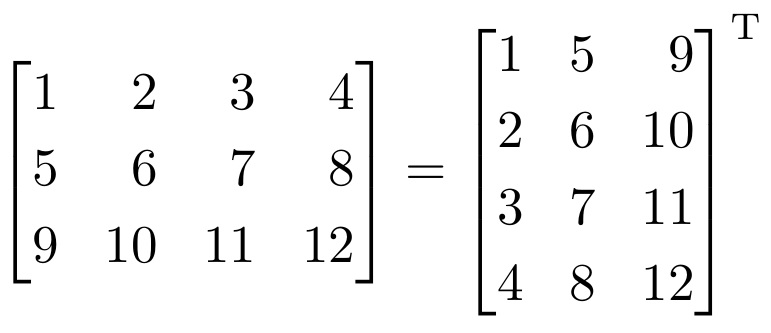
Transposing And Reshaping A Matrix Table Of Contents: arr.reshape(), arr.transpose(), arr.T (1) arr.reshape() Syntax: numpy.reshape(a, newshape, order=’C’) Parameters: a:array_like – Array to be reshaped. newshape: int or tuple of ints – The new shape should be compatible with the original shape. If an integer, then the result will be a 1-D array of that length. One shape dimension can be -1. In this case, the value is inferred from the length of the array and remaining dimensions. order{‘C’, ‘F’, ‘A’}, optional – Read the elements of a using this index order, and place the elements into the reshaped array using this index
-

How To Get Unique Items And Counts In Numpy ?
How To Get Unique Items And Counts In Numpy ? Table Of Contents: np.unique() Examples Of ‘np.unique( )’ (1) np.unique() Returns the sorted unique elements of an array. You can also get the unique element counts. Syntax: numpy.unique(ar, return_index=False, return_inverse=False, return_counts=False, axis=None, *, equal_nan=True) Parameters: ar: array_like – Input array. Unless axis is specified, this will be flattened if it is not already 1-D. return_index: bool, optional – If True, also return the indices of ar (along the specified axis, if provided, or in the flattened array) that result in the unique array. return_inverse: bool, optional – If True, also return the indices of
