-
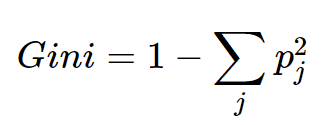
Gini Index In Decision Tree.
GINI Index In Decision Tree Table Of Contents: What Is the GINI Index? Interpreting GINI Index. Example Of GINI Index. What Is the GINI Coefficient? (1) What Is GINI Index? The Gini index, also known as the Gini impurity, is a measure used in decision tree algorithms to quantify the impurity or randomness of a set of examples within a particular node. It is an alternative criterion, alongside entropy, for determining the best feature to split the data. The Gini index is calculated based on the distribution of class labels within a node. It measures the probability of incorrectly classifying
-
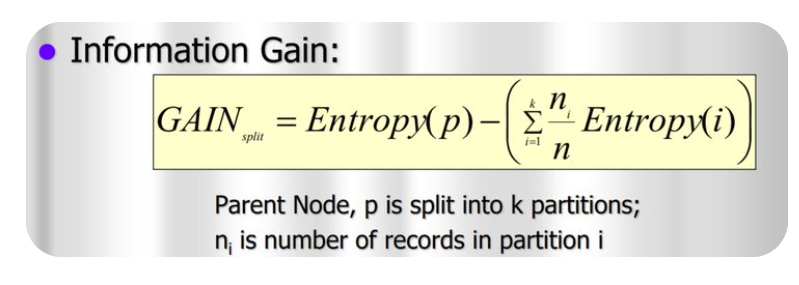
Information Gain In Decision Tree.
Information Gain Table Of Contents: What Is Information Gain? Example Of Information Gain. (1) What Is Information Gain? Information gain is a measure used in decision tree algorithms to determine the best feature to split the data. It quantifies how much information a particular feature contributes to reducing the entropy or impurity within a node. The information gain is calculated by comparing the entropy of the parent node (before the split) with the weighted average of the entropies of the child nodes (after the split), considering each possible outcome of the feature being evaluated. A higher information gain indicates that
-

Entropy In Decision Tree .
Entropy In Decision Tree Table Of Contents: What Is Entropy? Interpreting Entropy. Formula For Entropy. How Decision Tree Uses Entropy? Example Of Entropy Calculation. (1) What Is Entropy? Entropy is a concept used in the context of decision trees to measure the impurity or randomness of a set of examples within a particular node. In Decision Tree algorithms, Entropy is used as a criterion to determine the best feature for splitting the data. In the context of decision trees, entropy is calculated based on the distribution of class labels within a node. If a node contains only examples from a
-

Decision Tree Algorithm.
Decision Tree Algorithm! Table Of Contents: Decision Tree Algorithm. Why Use Decision Trees? Types Of Decision Trees. Terminology Related To Decision Tree. Examples Of Decision Tree. Assumptions While Creating Decision Tree. How Decision Trees Work. Attribute Selection Measures. Advantages & Disadvantages Of Decision Tree. (1) What Is Decision Tree Algorithm? A decision tree is a non-parametric supervised learning algorithm for classification and regression tasks. It has a hierarchical tree structure consisting of a root node, branches, internal nodes, and leaf nodes. Decision trees are used for classification and regression tasks, providing easy-to-understand models. In a Decision tree, there are two nodes,
-
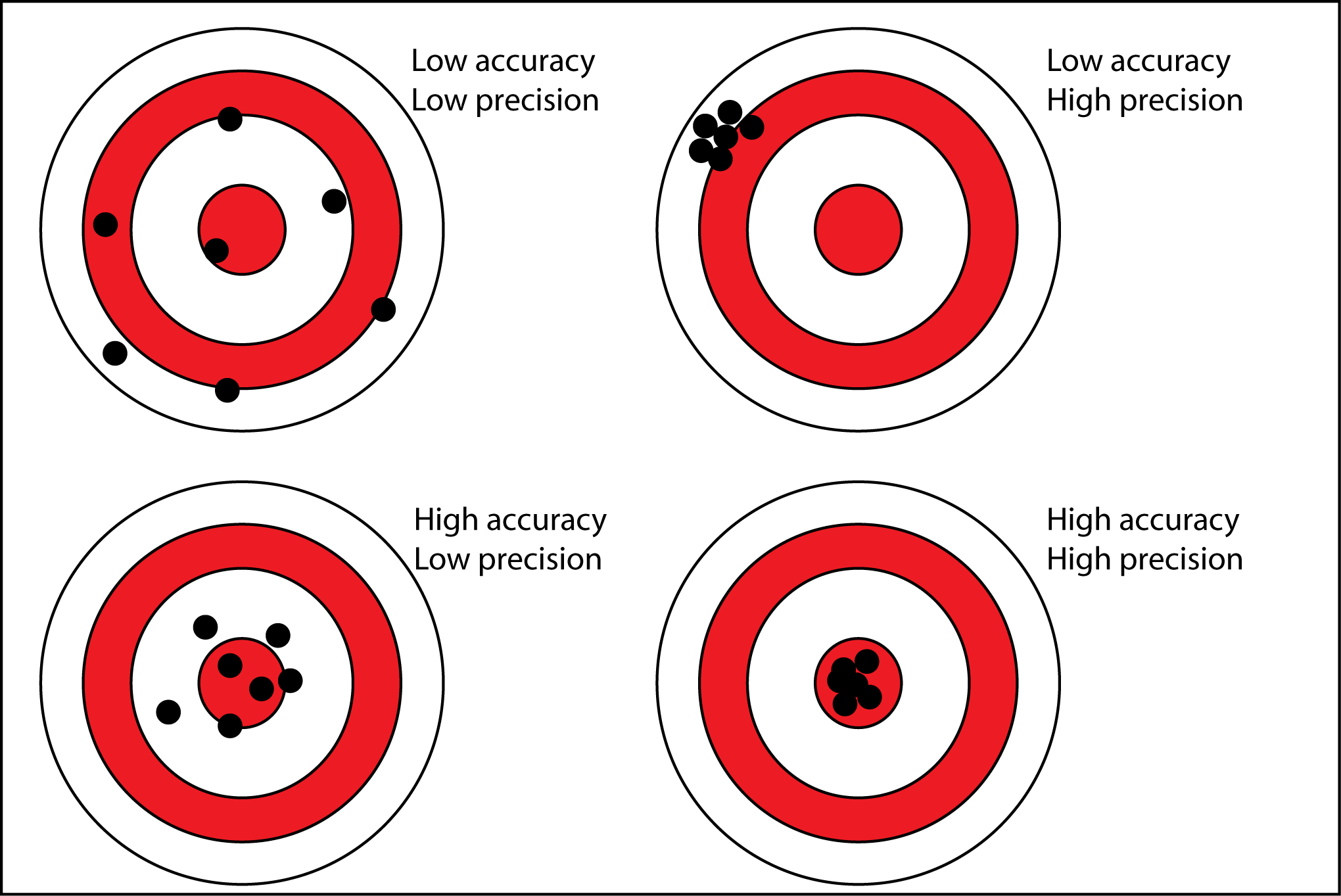
Binary Class Evaluation Metrices.
Evaluation Matrixes Table Of Contents: Accuracy Precision Recall (TPR, Sensitivity) Specificity (TNR) F1-Score FPR (Type I Error) FNR (Type II Error) (1) Accuracy: Accuracy simply measures how often the classifier makes the correct prediction. It’s the ratio between the number of correct predictions and the total number of predictions. The accuracy metric is not suited for imbalanced classes. Accuracy has its own disadvantages, for imbalanced data, when the model predicts that each point belongs to the majority class label, the accuracy will be high. But, the model is not accurate. It is a measure of correctness that is achieved in true prediction. In simple words, it tells us how many predictions are actually positive out
-
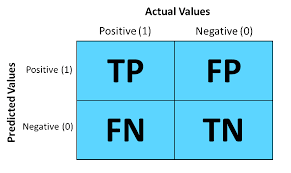
Confusion Metrix
Confusion Metrix Table Of Contents: What Is Confusion Metrix? Why We Need Confusion Metrix? Elements Of Confusion Metrix. Examples Of Confusion Metrix. Evaluation Matrixes. (1) Why We Need Confusion Metrix? In machine learning, Classification is used to split data into categories. But after cleaning and preprocessing the data and training our model, how do we know if our classification model performs well? That is where a confusion matrix comes into the picture. A confusion matrix is used to measure the performance of a classifier in depth. (2) What Is Confusion Metrix? A confusion matrix, also known as an error matrix,
-
Interpretation Of Logistic Regression Coefficients.
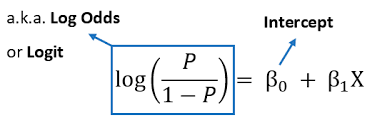
Interpretation Of Logistic Regression Coefficients. Table Of Contents: Understanding Logistic Regression Model. What Is Odd Ratio? What Is Log Odd Ratio? Examples Of Coefficients Interpretation. From Log Odds To Probability. Interpreting Coefficients. Examples Of Interpreting Coefficients. Interpreting Standard Error. How To Interpret Intercept? Odd Ratio Interpretation. More Reading Links. (1) Understanding Logistic Regression Model. Here’s what a Logistic Regression model looks like: You notice that it’s slightly different from a linear model. Let’s clarify each bit of it. logit(p) is just a shortcut for log(p/1-p), where p = P{Y = 1}, i.e. the probability of “success”, or the presence of an outcome. X₁
-

Maximum Likelihood Vs. Cost Function.
Maximum Likelihood Vs. Cost Function. Table Of Contents: What Is Maximum Likelihood? What Is Cost Function? Which One To Use Where? (1) What Is Maximum Likelihood Function? The likelihood function, denoted as L(θ | x), measures the probability of observing the given data (x) for different values of the model parameters (θ). It is a fundamental concept in statistical inference, particularly in cases where we want to estimate the parameters of a statistical model based on observed data. The likelihood function is constructed based on the assumption that the observed data points are independent and identically distributed (i.i.d.) and follow
-
What Is Likelihood In Statistics?
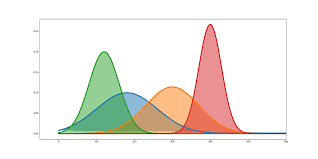
What Is Likelihood In Statistics? Table Of Contents: What Is Likelihood? What Is Likelihood Function? (1) What Is Likelihood? Probability in statistics tells us about, what is the percentage of chance that the event is going to happen, give we should know the distribution of the data points, like normal distribution, exponential distribution etc. Likelihood in statistics tells us that, given all the data points we need to find out which distribution the data points are falling into. Here our main focus is to find out the distribution estimates like, the mean and standard deviation of the population. In Likelihood
-
Logistic Regression.
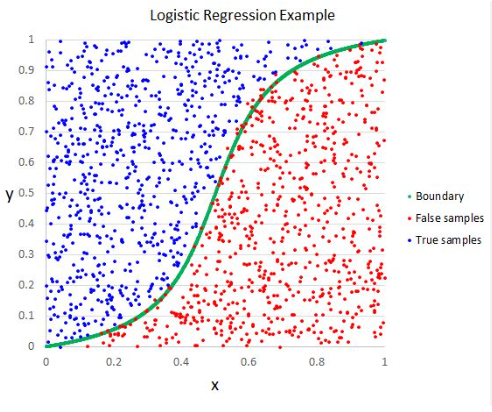
Logistic Regression Table Of Contents: What Is Logistic Regression? Types Of Logistic Regression. Why do we use Logistic regression rather than Linear Regression? Logistic Function. How Logistic Regression Maps Linear Regression Output? Cost Function In Logistic Regression. Likelihood Function For Logistic Regression. Gradient Descent Optimization. Assumptions Of Logistic Regression. (1) What Is Logistic Regression? Logistic Regression is a supervised machine learning algorithm mainly used for classification tasks. Where the goal is to predict the probability that an instance of belonging to a given class. It is commonly used when the dependent variable is categorical and takes on two possible outcomes, often referred
