-
Different Ways To Install Python Library
Different Ways To Install Python Library: I am taking an example of <argparse> library.Approach – 1: python setup.py installApproach – 2: easy_install argparseApproach – 3: pip install argparseApproach – 4: putting argparse.py in some directory listed in sys.path should also work
-
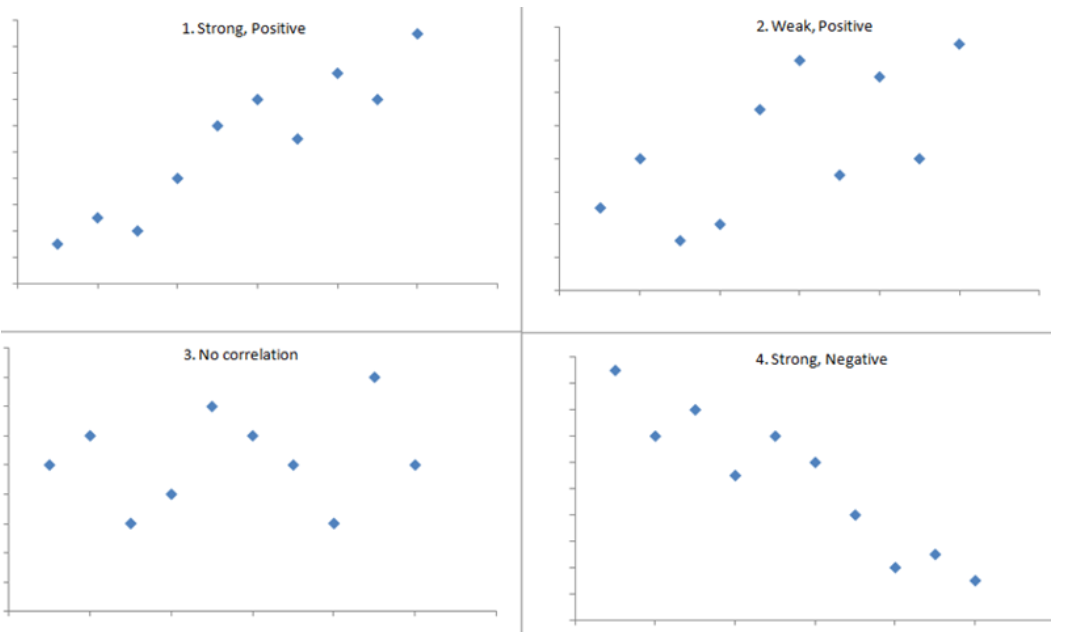
Linear Regression – Assumption – 2 (Pearson Correlation Coefficient)
Pearson Correlation Coefficient Table Of Contents: What Is Pearson Correlation Coefficient? Visualizing Pearson Correlation Coefficient. Formula For Pearson Coefficient. Example Of Pearson Coefficient. Difference In Correlation Coefficient and Regression Coefficient. (1) What Is Pearson Correlation Coefficient? The Pearson Correlation Coefficient (r) is the most common way of measuring a linear correlation. It is a number between –1 and 1 that measures the strength and direction of the relationship between two variables. The sample correlation coefficient is denoted as r. Super Note: The Pearson Coefficient can only tell you the is there any linear relationship between two variables or not. If the relationship
-

Assumptions In Linear Regression.
Assumptions In Linear Regression Table Of Contents: What Is A Parametric Model? Assumptions In Linear Regression. (1) What Is A Parametric Model? Regression is a parametric approach. ‘Parametric’ means it makes assumptions about data for the purpose of analysis. Due to its parametric side, regression is restrictive in nature. It fails to deliver good results with data sets that don’t fulfill its assumptions. Therefore, for a successful regression analysis, it’s essential to validate these assumptions. (2) Assumptions Of Linear Regression Model. Linear Relationship Between Input and Output. No Multicollinearity – No Linear Relationship Between Individual Variables. No Autocorrelation Of Error Terms.
-

Linear Regression Algorithm
Linear Regression Algorithm Table Of Contents: What Is Linear Regression? Equation For Linear Regression. Types Of Linear Regression. Linear Regression Line. How To Find The Best Fit Line? Cost Function For Linear Regression. Assumptions In Linear Regression. (1) What Is Linear Regression Model? It’s a Supervised Learning algorithm which goal is to predict continuous, numerical values based on given data input. If you want to mathematically model the behavior of a continuous variable you can use Linear Regression model. First as a Data Scientist you need to find out, what are the factors affecting the continuous variable. Then you can use
-

Reinforcement Machine Learning Algorithms.
-

Semisupervised Machine Learning Algorithms.
-

Unsupervised Machine Learning Algorithms.
Unsupervised Machine Learning Algorithms. Table Of Contents: What Is Unsupervised Machine Learning? Examples Of Unsupervised Machine Learning. Types Of Unsupervised Learning Algorithms. Unsupervised Machine Learning Algorithms. (1) What Is Unsupervised Machine Learning? Unsupervised learning is a method in which a machine learns without supervision. The machine learns by itself in an Unsupervised Learning style. The training is provided to the machine with the data set that has not been labeled, classified, or categorized, and the algorithm needs to act on that data without supervision. Unsupervised learning aims to restructure the input data into new features or a group of objects
-

Supervised Machine Learning Algorithms.
Supervised Learning Algorithms Table Of Contents: What Is Supervised Machine Learning. Examples Of Supervised Machine Learning. Types Of Supervised Learning Algorithms. Supervised Learning Algorithms. (1) What Is Supervised Machine Learning? Supervised Machine learning, is defined by its use of labeled datasets to train algorithms to classify data or predict outcomes accurately. As input data is fed into the model, the model adjusts its weights until it has been fitted appropriately. In supervised learning, the training data provided to the machines work as the supervisor that teaches the machines to predict the output correctly. (2) Examples Of Supervised Machine Learning. Example-1:
-

Data Science Algorithms.
Data Science Algorithms Table Of Contents: Types Of Machine Learning. Supervised Learning. Unsupervised Learning. Semi-Supervised Learning. Reinforcement Learning. (1)Types Of Machine Learning. Based on the way and style of machine learning from the data, Machine Learning is divided into 4 types. Supervised Machine Learning. Unsupervised Machine Learning. Semi-Supervised Machine Learning. Reinforcement Machine Learning. (2) Supervised Machine Learning. Supervised Machine learning, is defined by its use of labeled datasets to train algorithms to classify data or predict outcomes accurately. As input data is fed into the model, the model adjusts its weights until it has been fitted appropriately. In supervised learning,
-

What Is Data Science ?
What Is Data Science ? Table Of Contents: What Is Data Science? Why We Need Data Science? Data Science Prerequisites. What Is Data Science Used For Applications Of Data Science. Algorithms In Data Science. (1) What Is Data Science? Data Science is the study of data to extract meaningful insights for business. It is a multidisciplinary approach that combines principles and practices from the fields of mathematics, statistics, artificial intelligence, and computer engineering to analyze large amounts of data. This analysis helps Data Scientists to ask and answer questions like what happened, why it happened, what will happen, and what
