-

How To Select Specific Data Type Columns?
How To Select Specific Data Type Columns? Table Of Contents: Syntax To Select Specific DataType Columns. Examples Of Selecting Specific DataTypes. (1) Syntax: DataFrame.select_dtypes(include=None, exclude=None) Description: This method prints information about a DataFrame including the index dtype and columns, non-null values and memory usage. Parameters: include, exclude: scalar or list-like – A selection of dtypes or strings to be included/excluded. At least one of these parameters must be supplied. Returns: DataFrame – The subset of the frame including the dtypes in include and excluding the dtypes in exclude. Raises: ValueError- If both of include and exclude are empty If include and exclude have overlapping elements If any kind of string
-

How To Print Summary Of Your Data Frame?
How To Print Summary Of Your Data Frame? Table Of Contents: Syntax To Print Summary Of Data Frame. Examples Of Printing Summary. (1) Syntax: DataFrame.info(verbose=None, buf=None, max_cols=None, memory_usage=None, show_counts=None) Description: This method prints information about a DataFrame including the index dtype and columns, non-null values and memory usage.. Parameters: verbose: bool, optional – Whether to print the full summary. buf: writable buffer, defaults to sys.stdout – Where to send the output. By default, the output is printed to sys.stdout. memory_usage: bool, str, optional – Specifies whether total memory usage of the DataFrame elements (including the index) should be displayed. show_counts:
-

How To Get The DataTypes Of Columns Of A DataFrame?
How To Get The Data Types Of Columns Of A DataFrame? Table Of Contents: Syntax To Get The Data Types. Examples Of Getting Data Types. (1) Syntax pandas.DataFrame.dtypes pandas.DataFrame.dtypes.values Description: Return the dtypes of each columns of a DataFrame. (2) Examples Example-1 import pandas as pd student = {‘Name’:[‘Subrat’,’Abhispa’,’Arpita’,’Anuradha’,’Namita’], ‘Roll_No’:[100,101,102,103,104], ‘Subject’:[‘Math’,’English’,’Science’,’History’,’Commerce’], ‘Mark’:[95,88,76,73,93]} student_object = pd.DataFrame(student) student_object Output: student_object.dtypes Output: Name object Roll_No int64 Subject object Mark int64 dtype: object student_object.dtypes.values Output: array([dtype(‘O’), dtype(‘int64’), dtype(‘O’), dtype(‘int64’)], dtype=object) Example-2 import pandas as pd path = "E:BlogsPandasDocumentsMall_Customers.csv" customer_details = pd.read_csv(path) customer_details Output: customer_details.dtypes Output: CustomerID int64 Genre object Age int64 Annual_Income_(k$) int64 Spending_Score
-

How To Get The Columns Of A DataFrame?
How To Get The Columns Of A DataFrame? Table Of Contents: Syntax To Get The Column Names. Examples Of Fetching Column Names. (1) Syntax pandas.DataFrame.columns pandas.DataFrame.columns.values Description: It will fetch you the column names of the DataFrame. (2) Examples Of Columns : Example-1 import pandas as pd student = {‘Name’:[‘Subrat’,’Abhispa’,’Arpita’,’Anuradha’,’Namita’], ‘Roll_No’:[100,101,102,103,104], ‘Subject’:[‘Math’,’English’,’Science’,’History’,’Commerce’], ‘Mark’:[95,88,76,73,93]} student_object = pd.DataFrame(student) student_object Output: student_object.columns Output: Index([‘Name’, ‘Roll_No’, ‘Subject’, ‘Mark’], dtype=’object’) Note: Here you can see that, columns will give you, Index of Column names. Getting All The Column Values. student_object.column.values Output: array([‘Name’, ‘Roll_No’, ‘Subject’, ‘Mark’], dtype=object) Note: Here you can see that, columns.values will give
-

How To Get The Index Of A DataFrame?
How To Get The Index Of A DataFrame? Table Of Contents: Syntax Of Index Of DataFrame. Examples To Get The Index. (1) Syntax: pandas.DataFrame.index pandas.DataFrame.index.values Description: It will get you the index (row labels) of the DataFrame. (2) Examples Of Index : Example-1 import pandas as pd student = {‘Name’:[‘Subrat’,’Abhispa’,’Arpita’,’Anuradha’,’Namita’], ‘Roll_No’:[100,101,102,103,104], ‘Subject’:[‘Math’,’English’,’Science’,’History’,’Commerce’], ‘Mark’:[95,88,76,73,93]} student_object = pd.DataFrame(student) student_object Output: student_object.index Output: RangeIndex(start=0, stop=5, step=1) Note: Here you can see that, index starts from ‘0’ and stops at ‘5’, and the number of steps it increase is by ‘1’. Getting All The Index Values. student_object.index.values Output: array([0, 1, 2, 3, 4], dtype=int64)
-

How To Read CSV Files Using Pandas?
How To Read CSV Files Using Pandas? Table Of Contents: (1) How To Read CSV Files Using Pandas? (2) Examples Of Reading CSV Files. (1) How To Read CSV Files Using Pandas? Use the ‘read_csv( )’ method from pandas to read the CSV file. Read a comma-separated values (csv) file into DataFrame. Syntax: pandas.read_csv(filepath_or_buffer, *, sep=_NoDefault.no_default, delimiter=None, header=’infer’, names=_NoDefault.no_default, index_col=None, usecols=None, squeeze=None, prefix=_NoDefault.no_default, mangle_dupe_cols=True, dtype=None, engine=None, converters=None, true_values=None, false_values=None, skipinitialspace=False, skiprows=None, skipfooter=0, nrows=None, na_values=None, keep_default_na=True, na_filter=True, verbose=False, skip_blank_lines=True, parse_dates=None, infer_datetime_format=False, keep_date_col=False, date_parser=None, dayfirst=False, cache_dates=True, iterator=False, chunksize=None, compression=’infer’, thousands=None, decimal=’.’, lineterminator=None, quotechar=’"’, quoting=0, doublequote=True, escapechar=None, comment=None, encoding=None, encoding_errors=’strict’, dialect=None, error_bad_lines=None, warn_bad_lines=None,
-
How To Create Pandas Object?
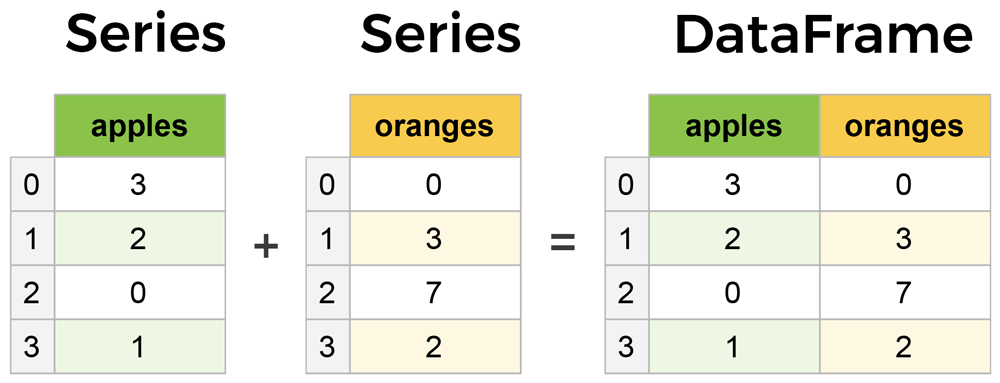
How To Create Pandas Object? Table Of Contents: What Is An Pandas Object? How To Create Pandas Data Frame? Creating Pandas Object Using Dictionary. Creating Pandas Object Using CSV File. Creating Pandas Object Using Excel File. Creating Pandas Object Using SQL Table. (1) What Is An Pandas Object? A data table with more than one row and column is considered a Pandas object. For example, a student table having the student’s details like name, roll number, mark etc. is considered a pandas object. This panda’s objects are called Pandas DataFrame. (2) How To Create Pandas DataFrame ? To create a
-

How To Check Pandas Version?
How To Check Pandas Version? Table Of Contents: Import Pandas and Check Version. Using ‘pip’ Command To Check the Version. (1) Import Pandas and Check Version. import pandas as pd pd.__version__ Output: ‘1.4.2’ Note: If you are getting the version name, then everything is fine. (2) Using pip Command To Check Version. pip show pandas Note: If it is showing you the details, then everything is fine.
-

Verifying Pandas Installed Successfully
Verifying Pandas Installed Successfully Table Of Contents: Import Pandas and Check Version. Using ‘pip’ Command To Check the Version. (1) Import Pandas and Check Version. import pandas as pd pd.__version__ Output: ‘1.4.2’ Note: If you are getting the version name, then everything is fine. (2) Using pip Command To Check Version. pip show pandas Note: If it is showing you the details, then everything is fine.
-

How To Install Pandas?
How To Install Pandas? Table Of Contents: Installing With pip. Installing With Anaconda. (1) Installing With pip The easiest way to install pandas is to install using ‘pip’ command. Step-1: Open The Command Prompt Step-2: Run The Bellow Command For Installation pip install pandas Step-3: Check If It’s Installed Successfully Or Not. pip show pandas (2) Installing With Anaconda Another way to install pandas is to install it as part of the Anaconda distribution, a cross-platform distribution for data analysis and scientific computing. This is the recommended installation method for most users. Step-1: Open The Anaconda Website https://www.anaconda.com/ Step-2: Select
