-
EAP – How Agent Graph Is Being Implemented ?
EAP – How Build Agentic Workflow? app/api/routes.py from uuid import uuid4 from fastapi import APIRouter, Depends from app.api.dependencies import get_agent_graph, get_memory from app.core.config import get_settings from app.middleware.auth import require_user from app.schemas.chat import ChatRequest, ChatResponse from app.schemas.incident import IncidentCreate from app.schemas.response import HealthResponse from app.tools.incident_tools import create_incident router = APIRouter() @router.get("/health", response_model=HealthResponse) async def health(): settings = get_settings() return HealthResponse(status="ok", environment=settings.app_env) @router.post("/v1/chat", response_model=ChatResponse) async def chat(request: ChatRequest, user: dict = Depends(require_user)): conversation_id = request.conversation_id or str(uuid4()) memory = get_memory() memory.add(conversation_id, "user", request.message) result = await get_agent_graph().ainvoke({"message": request.message, "conversation_id": conversation_id}) memory.add(conversation_id, "assistant", result["answer"]) return ChatResponse(answer=result["answer"], conversation_id=conversation_id, intent=result["intent"], sources=result.get("sources", [])) @router.post("/v1/incidents") async def
-
EAP – How You Have Implemented Conversational Memory ?
EAP – How You Handle Conversation Memory? Table Of Contents: app/api/routes.py from uuid import uuid4 from fastapi import APIRouter, Depends from app.api.dependencies import get_agent_graph, get_memory from app.core.config import get_settings from app.middleware.auth import require_user from app.schemas.chat import ChatRequest, ChatResponse from app.schemas.incident import IncidentCreate from app.schemas.response import HealthResponse from app.tools.incident_tools import create_incident router = APIRouter() @router.get("/health", response_model=HealthResponse) async def health(): settings = get_settings() return HealthResponse(status="ok", environment=settings.app_env) @router.post("/v1/chat", response_model=ChatResponse) async def chat(request: ChatRequest, user: dict = Depends(require_user)): conversation_id = request.conversation_id or str(uuid4()) memory = get_memory() memory.add(conversation_id, "user", request.message) result = await get_agent_graph().ainvoke({"message": request.message, "conversation_id": conversation_id}) memory.add(conversation_id, "assistant", result["answer"]) return ChatResponse(answer=result["answer"], conversation_id=conversation_id, intent=result["intent"], sources=result.get("sources",
-
EAP – How You Handle Conversation ?
EAP – How You Handle Conversation? Table Of Contents: from uuid import uuid4 from fastapi import APIRouter, Depends from app.api.dependencies import get_agent_graph, get_memory from app.core.config import get_settings from app.middleware.auth import require_user from app.schemas.chat import ChatRequest, ChatResponse from app.schemas.incident import IncidentCreate from app.schemas.response import HealthResponse from app.tools.incident_tools import create_incident router = APIRouter() @router.get("/health", response_model=HealthResponse) async def health(): settings = get_settings() return HealthResponse(status="ok", environment=settings.app_env) @router.post("/v1/chat", response_model=ChatResponse) async def chat(request: ChatRequest, user: dict = Depends(require_user)): conversation_id = request.conversation_id or str(uuid4()) memory = get_memory() memory.add(conversation_id, "user", request.message) result = await get_agent_graph().ainvoke({"message": request.message, "conversation_id": conversation_id}) memory.add(conversation_id, "assistant", result["answer"]) return ChatResponse(answer=result["answer"], conversation_id=conversation_id, intent=result["intent"], sources=result.get("sources", [])) @router.post("/v1/incidents")
-
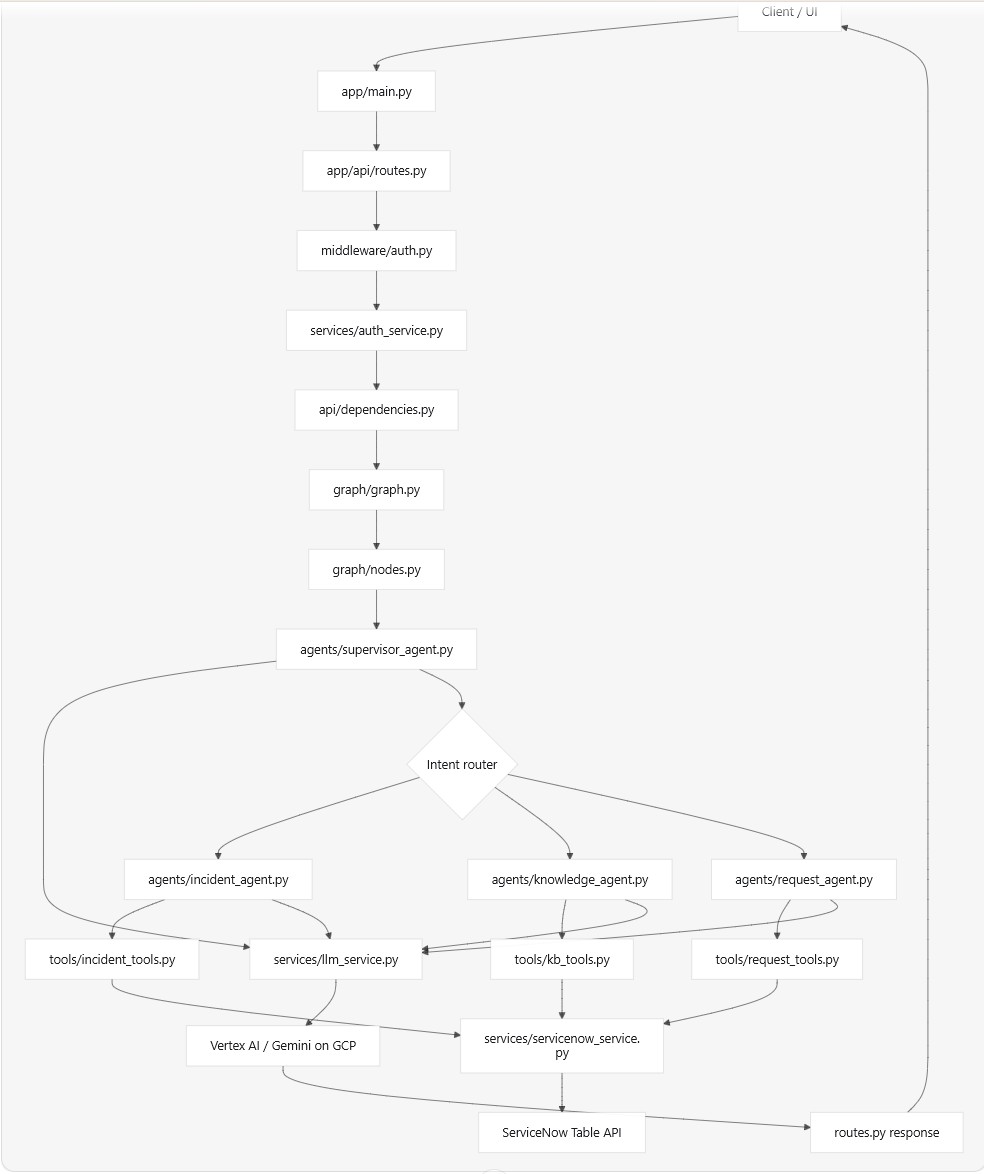
EAP – Agentic Platform Flowchart
Agentic Platform Flowchart app/main.py import logging from contextlib import asynccontextmanager from fastapi import FastAPI from app.api.routes import router from app.core.config import get_settings from app.db.session import init_db from app.middleware.logging import request_logging from app.middleware.tracing import tracing @asynccontextmanager async def lifespan(_:FastAPI): init_db() yield def create_app()-> FastAPI: settings = get_settings() logging.basicConfig(level = settings.log_level) app = FastAPI(title="Service Now Agentic AI", version="1.0.0", lifespan=lifespan) app.middleware('http')(tracing) app.middleware('http')(request_logging) app.include_router(router) return app app = create_app() app/api/routes.py from uuid import uuid4 from fastapi import APIRouter, Depends from app.api.dependencies import get_agent_graph, get_memory from app.core.config import get_settings from app.middleware.auth import require_user from app.schemas.chat import ChatRequest, ChatResponse from app.schemas.incident import IncidentCreate from app.schemas.response import
-
ERP – Vector Retrival
EAP – Vector Retrival
-
ERP – Vector Storage
EAP – Vector Storage
-
EAP – Document Indexing
EAP – Document Indexing # ── STEP 3 + 4: Embed + index ───────────────────────── collection_id = f"col-{tenant_id}" logger.info("📦 Indexing Into Vector Search") t0 = perf_counter() index_result = await index_chunks( project_id=PROJECT_ID, location=LOCATION, collection_id=collection_id, chunks=all_chunks, event_status=event_status, ) timings["indexing"] = perf_counter() – t0 logger.info(f"✅ Indexing Complete [{_fmt(timings['indexing'])}]") import logging import hashlib from typing import List, Dict from rag_pipeline.indexing import VectorIndexClient, enforce_schema from rag_pipeline.indexing.helpers import ( build_data_schema, build_auto_embedding_vector_schema, ) logger = logging.getLogger("VectorIndexingService") # – – ———————————— # Schema Configuration # – – ———————————— EMBEDDING_FIELD = "embedding" DATA_SCHEMA = build_data_schema( properties={ "file_name": {"type": "string"}, "body": {"type": "string"}, }, required=["body"], ) VECTOR_SCHEMA = build_auto_embedding_vector_schema( embedding_field=EMBEDDING_FIELD, text_template="{body}",
-
EAP – Document Chunking Process
EAP – Document Chunking Why We Need Chunking ? # ── STEP 2: Chunk parsed files ───────────────────────── chunked_prefix = f"{tenant_id}/{connector_id}/chunked" logger.info("🧩 Chunking Parsed Files") t0 = perf_counter() chunk_result = await chunk_files( input_bucket=bucket, input_prefix=parsed_prefix, output_bucket=bucket, output_prefix=chunked_prefix, ) timings["chunking"] = perf_counter() – t0 logger.info( f"Chunking complete [{_fmt(timings['chunking'])}]: " f"processed={chunk_result['processed']} | " f"success={chunk_result['succeeded']} | " f"failed={chunk_result['failed']}" ) all_chunks = [ {"file_name": item.get("gcs_uri", ""), "body": chunk["body"]} for item in chunk_result["results"] if item["status"] == "success" for chunk in item["chunks"] ] logger.info(f"🧩 Total Chunks Collected: {len(all_chunks)}") from __future__ import annotations import asyncio import json import logging import re from pathlib import Path from typing import Any
-
EAP – Document AI Parser
EAP – Document AI Parser # ── STEP 1: Parse files via DocAI ───────────────────────── parsed_prefix = f"{tenant_id}/{connector_id}/parsed" logger.info("📄 Parsing Files With DocAI") t0 = perf_counter() parse_result = await parse_files( input_bucket=bucket, input_prefix=base_path, engine="docai", output_prefix_base=parsed_prefix, ) timings["parsing"] = perf_counter() – t0 logger.info( f"Parsing complete [{_fmt(timings['parsing'])}]: " f"processed={parse_result['processed']} | " f"success={parse_result['succeeded']} | " f"failed={parse_result['failed']}" ) async def parse_files( input_bucket: str, engine: str = "mistral", input_prefix: str | None = None, output_bucket: str | None = None, output_prefix_base: str | None = "parsed", ) -> dict: """ Parse files from an input GCS bucket and upload parsed outputs. Files are discovered by listing blobs
-
EAP – RAG Pipeline Design
EAP – RAG Pipeline Design 1. A document event arrives └─ Via Google Pub/Sub, or HTTP POST `/invoke` 2. `main.py` starts the pipeline └─ Reads tenant, connector, bucket, file path, and event type └─ Ignores duplicate events already in progress 3. Parse documents └─ Reads files from Google Cloud Storage └─ Uses Document AI by default └─ Extracts text, tables, layout, and image details └─ Saves parsed output under: `{tenant}/{connector}/parsed` 4. Chunk documents └─ Splits parsed content into small meaningful sections └─ Keeps headings/metadata where possible └─ Saves chunks under: `{tenant}/{connector}/chunked` 5. Index chunks └─ Creates/uses a tenant collection: `col-{tenant_id}`