-

How To Get The DataTypes Of Columns Of A DataFrame?
How To Get The Data Types Of Columns Of A DataFrame? Table Of Contents: Syntax To Get The Data Types. Examples Of Getting Data Types. (1) Syntax pandas.DataFrame.dtypes pandas.DataFrame.dtypes.values Description: Return the dtypes of each columns of a DataFrame. (2) Examples Example-1 import pandas as pd student = {‘Name’:[‘Subrat’,’Abhispa’,’Arpita’,’Anuradha’,’Namita’], ‘Roll_No’:[100,101,102,103,104], ‘Subject’:[‘Math’,’English’,’Science’,’History’,’Commerce’], ‘Mark’:[95,88,76,73,93]} student_object = pd.DataFrame(student) student_object Output: student_object.dtypes Output: Name object Roll_No int64 Subject object Mark int64 dtype: object student_object.dtypes.values Output: array([dtype(‘O’), dtype(‘int64’), dtype(‘O’), dtype(‘int64’)], dtype=object) Example-2 import pandas as pd path = "E:BlogsPandasDocumentsMall_Customers.csv" customer_details = pd.read_csv(path) customer_details Output: customer_details.dtypes Output: CustomerID int64 Genre object Age int64 Annual_Income_(k$) int64 Spending_Score
-

How To Get The Columns Of A DataFrame?
How To Get The Columns Of A DataFrame? Table Of Contents: Syntax To Get The Column Names. Examples Of Fetching Column Names. (1) Syntax pandas.DataFrame.columns pandas.DataFrame.columns.values Description: It will fetch you the column names of the DataFrame. (2) Examples Of Columns : Example-1 import pandas as pd student = {‘Name’:[‘Subrat’,’Abhispa’,’Arpita’,’Anuradha’,’Namita’], ‘Roll_No’:[100,101,102,103,104], ‘Subject’:[‘Math’,’English’,’Science’,’History’,’Commerce’], ‘Mark’:[95,88,76,73,93]} student_object = pd.DataFrame(student) student_object Output: student_object.columns Output: Index([‘Name’, ‘Roll_No’, ‘Subject’, ‘Mark’], dtype=’object’) Note: Here you can see that, columns will give you, Index of Column names. Getting All The Column Values. student_object.column.values Output: array([‘Name’, ‘Roll_No’, ‘Subject’, ‘Mark’], dtype=object) Note: Here you can see that, columns.values will give
-

How To Get The Index Of A DataFrame?
How To Get The Index Of A DataFrame? Table Of Contents: Syntax Of Index Of DataFrame. Examples To Get The Index. (1) Syntax: pandas.DataFrame.index pandas.DataFrame.index.values Description: It will get you the index (row labels) of the DataFrame. (2) Examples Of Index : Example-1 import pandas as pd student = {‘Name’:[‘Subrat’,’Abhispa’,’Arpita’,’Anuradha’,’Namita’], ‘Roll_No’:[100,101,102,103,104], ‘Subject’:[‘Math’,’English’,’Science’,’History’,’Commerce’], ‘Mark’:[95,88,76,73,93]} student_object = pd.DataFrame(student) student_object Output: student_object.index Output: RangeIndex(start=0, stop=5, step=1) Note: Here you can see that, index starts from ‘0’ and stops at ‘5’, and the number of steps it increase is by ‘1’. Getting All The Index Values. student_object.index.values Output: array([0, 1, 2, 3, 4], dtype=int64)
-

How To Read CSV Files Using Pandas?
How To Read CSV Files Using Pandas? Table Of Contents: (1) How To Read CSV Files Using Pandas? (2) Examples Of Reading CSV Files. (1) How To Read CSV Files Using Pandas? Use the ‘read_csv( )’ method from pandas to read the CSV file. Read a comma-separated values (csv) file into DataFrame. Syntax: pandas.read_csv(filepath_or_buffer, *, sep=_NoDefault.no_default, delimiter=None, header=’infer’, names=_NoDefault.no_default, index_col=None, usecols=None, squeeze=None, prefix=_NoDefault.no_default, mangle_dupe_cols=True, dtype=None, engine=None, converters=None, true_values=None, false_values=None, skipinitialspace=False, skiprows=None, skipfooter=0, nrows=None, na_values=None, keep_default_na=True, na_filter=True, verbose=False, skip_blank_lines=True, parse_dates=None, infer_datetime_format=False, keep_date_col=False, date_parser=None, dayfirst=False, cache_dates=True, iterator=False, chunksize=None, compression=’infer’, thousands=None, decimal=’.’, lineterminator=None, quotechar=’"’, quoting=0, doublequote=True, escapechar=None, comment=None, encoding=None, encoding_errors=’strict’, dialect=None, error_bad_lines=None, warn_bad_lines=None,
-
How To Create Pandas Object?
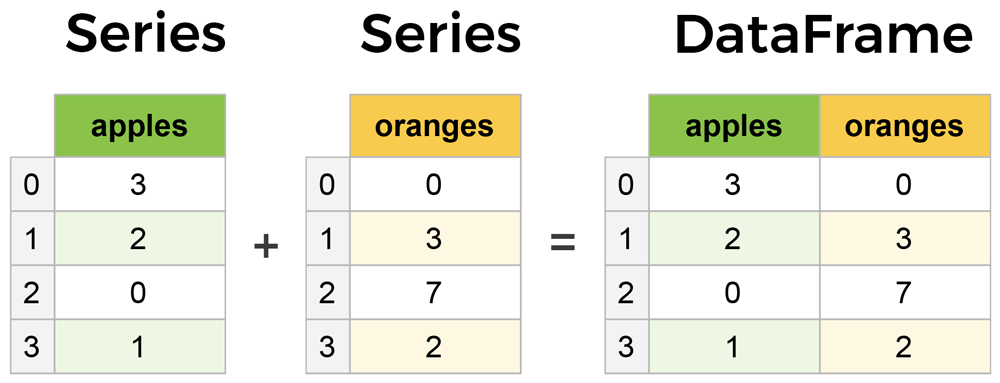
How To Create Pandas Object? Table Of Contents: What Is An Pandas Object? How To Create Pandas Data Frame? Creating Pandas Object Using Dictionary. Creating Pandas Object Using CSV File. Creating Pandas Object Using Excel File. Creating Pandas Object Using SQL Table. (1) What Is An Pandas Object? A data table with more than one row and column is considered a Pandas object. For example, a student table having the student’s details like name, roll number, mark etc. is considered a pandas object. This panda’s objects are called Pandas DataFrame. (2) How To Create Pandas DataFrame ? To create a
-

How To Check Pandas Version?
How To Check Pandas Version? Table Of Contents: Import Pandas and Check Version. Using ‘pip’ Command To Check the Version. (1) Import Pandas and Check Version. import pandas as pd pd.__version__ Output: ‘1.4.2’ Note: If you are getting the version name, then everything is fine. (2) Using pip Command To Check Version. pip show pandas Note: If it is showing you the details, then everything is fine.
-

Verifying Pandas Installed Successfully
Verifying Pandas Installed Successfully Table Of Contents: Import Pandas and Check Version. Using ‘pip’ Command To Check the Version. (1) Import Pandas and Check Version. import pandas as pd pd.__version__ Output: ‘1.4.2’ Note: If you are getting the version name, then everything is fine. (2) Using pip Command To Check Version. pip show pandas Note: If it is showing you the details, then everything is fine.
-

How To Install Pandas?
How To Install Pandas? Table Of Contents: Installing With pip. Installing With Anaconda. (1) Installing With pip The easiest way to install pandas is to install using ‘pip’ command. Step-1: Open The Command Prompt Step-2: Run The Bellow Command For Installation pip install pandas Step-3: Check If It’s Installed Successfully Or Not. pip show pandas (2) Installing With Anaconda Another way to install pandas is to install it as part of the Anaconda distribution, a cross-platform distribution for data analysis and scientific computing. This is the recommended installation method for most users. Step-1: Open The Anaconda Website https://www.anaconda.com/ Step-2: Select
-

Introduction To Pandas
Introduction To Pandas Table Of Contents: What Is Pandas ? Why To Use Pandas ? (1) What Is Pandas? Pandas is an open-source Python library developed by Wes McKinney in 2008. Pandas provide a data container that is used to store 1D, 2D and 3D data. Pandas provide varieties of in-built methods, that can be used for data handling purposes. Like in SQL you write queries to retrieve and manipulate a dataset, similarly, you can use Pandas to do the operations in Python. Pandas is a well-known popular Python library, that Data Scientists are used for their data analysis activity. Pandas is an easy-to-learn library, so let’s get started. (2) Why To Use Pandas ? Pandas make your life easier by providing different in-built methods, which you will use for data analysis. By Pandas you can perform multiple operations like, Data Retrieval. Data Filtering. Data Normalization. Merges and Joins. Data Visualization.
-

Pandas Syllabus
Pandas Syllabus Introduction To Pandas? How To Install Pandas? Verifying All Good. How To Check Pandas Version? How To Create Pandas Object? How To View Top and Bottom Records In Pandas DataFrame? How To Display index, columns, and values In a DataFrame? How To Show Static Summary Of Your DataFrame? How To Transpose Your DataFrame? How To Sort DataFrame Based On An Index? How To Sort DataFrame Based On Values? How To Select A Single Column Value In A DataFrame? How To Select Records Using []? How To Select Records Using loc? How To Select Records Using iloc? How To
