GenAI – Instruction Tuning.
Table Of Contents:
- What Is Instruction Tuning?
- Steps Involved In Instruction Tuning.
- Example Of Instruction Tuning.
- Instruction Tuning Vs Few Shot Prompting.
(1) What Is Instruction Tuning ?

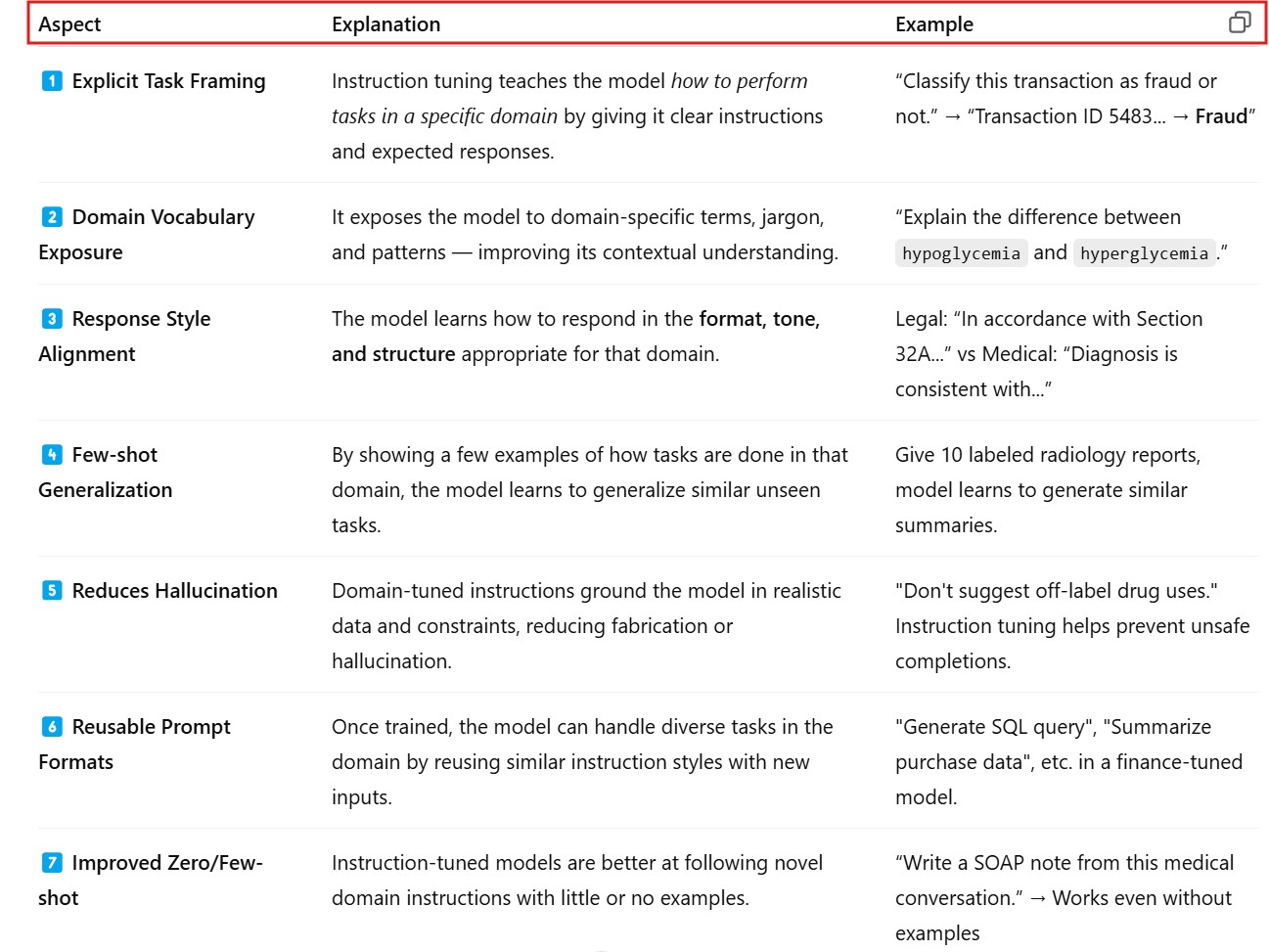
(2) How Instruction Tuning Helps ?

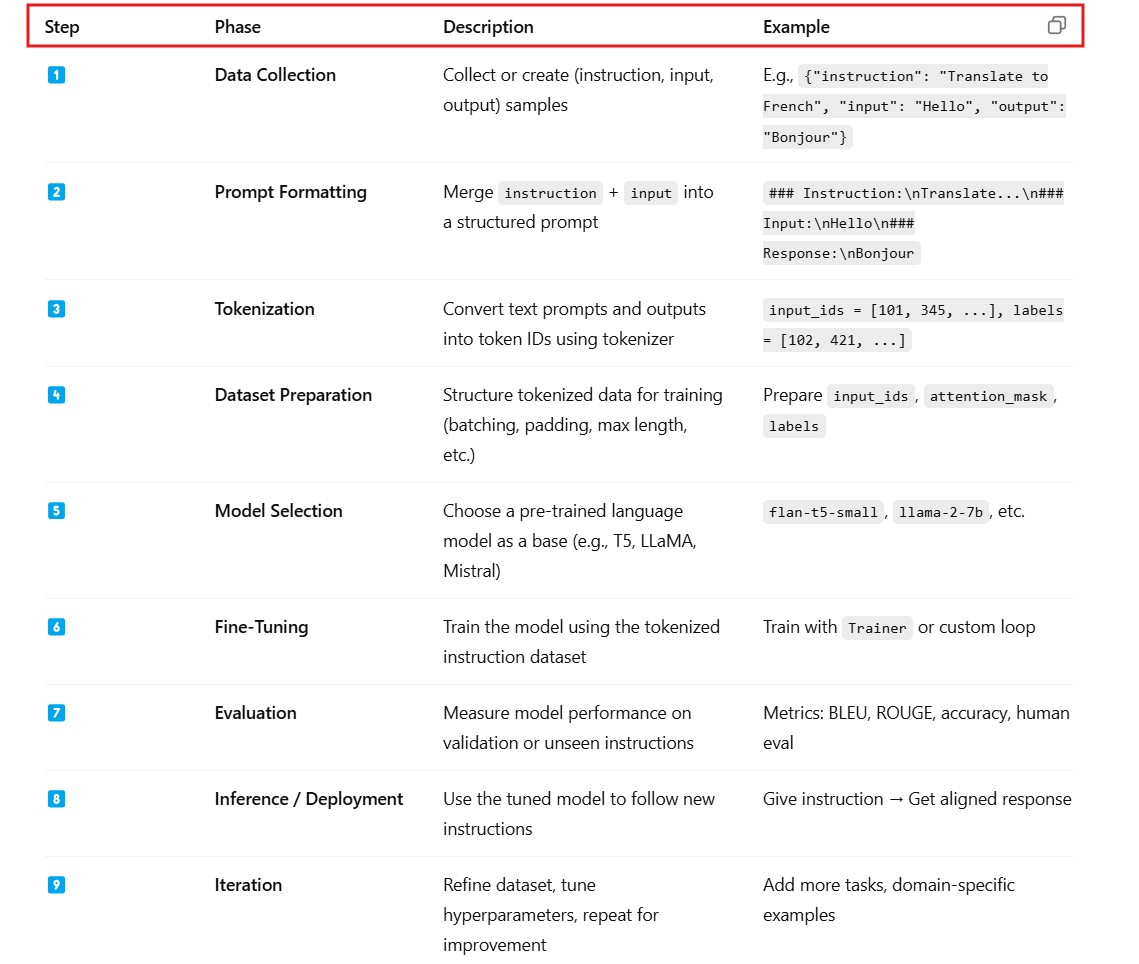
(2) Steps Involved In Instruction Tuning .
(2) Example Of Instruction Tuning ?

Step-1: Install Required Libraries
pip install transformers datasets peft accelerate bitsandbytes
Step-2: Sample Instruction Dataset
- We’ll use a few inline samples. In real cases, use a larger dataset like Alpaca, FLAN, or Self-Instruct.
from datasets import Dataset

# Sample toy dataset with instruction-style tasks
data = [
    {
        "instruction": "Translate to French",
        "input": "I love apples.",
        "output": "J'aime les pommes."
    },
    {
        "instruction": "Summarize the sentence",
        "input": "Artificial Intelligence is transforming industries by automating tasks.",
        "output": "AI automates tasks and transforms industries."
    },
    {
        "instruction": "Convert to past tense",
        "input": "She walks to school.",
        "output": "She walked to school."
    },
]

dataset = Dataset.from_list(data)
Step-3: Format the Prompts
def format_prompt(example):
    return {
        "text": f"### Instruction:\n{example['instruction']}\n\n### Input:\n{example['input']}\n\n### Response:\n{example['output']}"
    }

formatted_dataset = dataset.map(format_prompt)
Step-4: Tokenization

from transformers import AutoTokenizer

model_name = "google/flan-t5-small"
tokenizer = AutoTokenizer.from_pretrained(model_name)

def tokenize(example):
    model_input = f"### Instruction:\n{example['instruction']}\n\n### Input:\n{example['input']}\n\n### Response:"
    target = example["output"]
    tokenized = tokenizer(model_input, truncation=True, padding="max_length", max_length=256)
    with tokenizer.as_target_tokenizer():
        tokenized["labels"] = tokenizer(target, truncation=True, padding="max_length", max_length=128)["input_ids"]
    return tokenized

tokenized_dataset = dataset.map(tokenize)
Step-5: Train the Model with Hugging Face Trainer
from transformers import AutoModelForSeq2SeqLM, TrainingArguments, Trainer

model = AutoModelForSeq2SeqLM.from_pretrained(model_name)

training_args = TrainingArguments(
    output_dir="./flan-t5-instruct",
    evaluation_strategy="no",
    learning_rate=2e-4,
    per_device_train_batch_size=2,
    num_train_epochs=3,
    weight_decay=0.01,
    logging_dir='./logs',
    logging_steps=10,
    save_strategy="no"
)

trainer = Trainer(
    model=model,
    args=training_args,
    train_dataset=tokenized_dataset,
    tokenizer=tokenizer
)

trainer.train()
Step-6: Inference / Testing
def generate_response(instruction, input_text):
    prompt = f"### Instruction:\n{instruction}\n\n### Input:\n{input_text}\n\n### Response:"
    input_ids = tokenizer(prompt, return_tensors="pt").input_ids
    output_ids = model.generate(input_ids, max_length=64)
    return tokenizer.decode(output_ids[0], skip_special_tokens=True)

# Try it
print(generate_response("Translate to French", "I love oranges."))
print(generate_response("Convert to past tense", "He plays football."))
(4) Instruction Tuning Vs Few Shot Prompting.

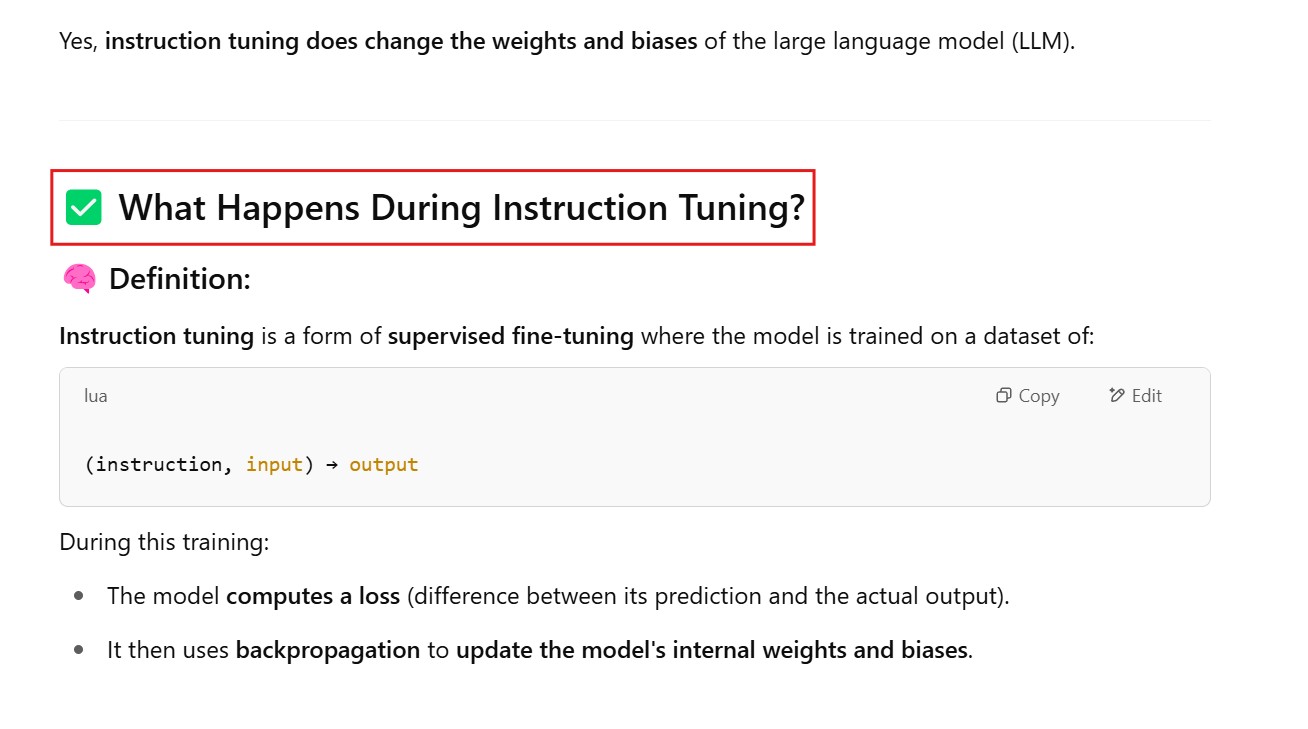
(5) Does instruction tuning changes the weights and biases of the LLM