-

GIT – How To Clone A Repository ?
How To Clone A Repository ? Table Of Contents: What Is GIT Cloning? How To Clone A Repository? (1) What Is GIT Cloning ? GIT cloning is the method of making a copy of a target repository. This target repository can be a remote or a local one. When you are new to an existing project, the first step is to clone the project repository, so that you can work in your local system. (2) How To Clone A Repository ? Use the below command to clone an entire repository. git clone <repository URL> Example-1: If You Are Using BitBucket
-

GIT – How To Check The Previous Commits ?
How To Check The Previous Commits ? Table Of Contents: How To Check The Previous Commits? How To Count The Number Of Commits? (1) How To Check The Previous Commits? To check the previous commits you have done, use the below command. git log – raw Note: Here you can see the number of commits you have done and the files that you have committed. (2) How To Count The Number Of Commits? To count the commits for the branch you are on: git rev-list – count HEAD To count the commits for the particular branch git rev-list – count
-

GIT – How To Commit Your Changes ?
How To Commit Your Changes Table Of Contents: What Is GIT Commit? How To Commit Your Changes. Examples Of Committing Your Changes. (1) What Is GIT Commit ? When you are confirmed that whatever the changes you made are correct, it’s time for you to commit the changes to the ‘git’ repository. GIT Commit will ensure that, whatever changes you have made to the file system, will be persisted by the GIT. If you did some mistake in future, you can always roll back to the previous commits. (2) How To Commit Your Changes ? Method-1 git commit Note: A
-

GIT – How To Check Status Of Your Files?
How To Check Status Of Your Files? Table Of Contents: What Is The Status Of A File? How To Check The Status Of Files? Examples Of Checking Status. (1) What Is The Status Of A File? By knowing the status of a file we can see, which changes have been staged, which haven’t, and which files aren’t being tracked by Git. It will just show you, in which state the files are. (2) How To Check Status Of Files? To check the status of the file run the below command. git status (3) Examples Of Checking Status Example-1: Initial State
-

GIT – How To Add Files To Stagging Area?
How To Add Files To Stagging Area? Table Of Contents: What Is A Staging Area? Adding Files To Staging Area? Examples Of Adding Files. (1) What Is A Staging Area ? A stage is something where people come for an audition, or performance being judged by the judges and gets selected. Likewise in ‘GIT’ , a staging area is something where you put your files for GIT to track, and you review what are the changes you have done. After you finalize the files, then you can commit them to the ‘git’ repository. (2) Adding Files To The Staging Area.
-

GIT – Adding Files To Project.
Adding Files To Project Table Of Contents: Adding Files To Project. Checking The Status Of The Repository. (1) Add Files To Your Project: After you initialize your GIT repository, it’s time to add files to your project folder. Whatever files, folders, or images you add to your project, GIT will be able to track it. (2) Checking Status Of The Repository To check the status of the GIT repository run the below command. git status Note: Here you can see, It is showing ‘Untracked Files’. That means these files are still in your local folder. To be able to track
-
GIT – How To Create A GIT Repository ?
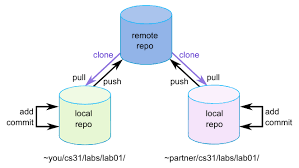
How To Create A GIT Repository ? Table Of Contents: Create Your New Project Folder. Initializing The Project Folder With GIT. (1) Creating A New Project Folder Create your project directory where you want to keep all of your project files. (2) Initialize The Folder With GIT You need to initialize your new folder with GIT, so that it will track the history of the files. Go inside the project folder and run the below command. Step-1: Go Inside The Project Folder Step-2: Right Click Inside The Folder and Select GIT Bash Here Step-3: GIT Command Prompt Will Open Step-4:
-
GIT – What Is A GIT Repository ?
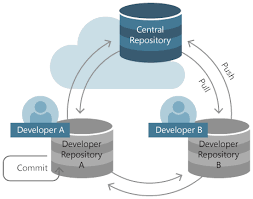
What Is A GIT Repository ? Table Of Contents What Is Git Repository ? Types Of Git Repository ? (1) What Is A GIT Repository? A Git repository (repo) is a storage location where all the files, history, and version control information of a project are kept. It helps track changes, collaborate with others, and revert to previous versions when needed. (2) Types Of GIT Repository? There are two types of Git repository. Local Repository Remote Repository (3) Local GIT Repository. Store all the file history, branches and other settings in your local computer. A Git repository is the .git/ folder inside
-

GIT – GIT Environment Setup
GIT Environment Setup Table Of Contents: What Is GIT Environment Setup? Setting Up GIT Environment Variables. (1) What Is GIT Environment Setup ? If you are working with other developers, you need to know who is checking the code in and out, and making the changes. Setting user.name and user. email is the necessary configuration option as your name and email appear in your commit messages. (2) Setting Up GIT Environment Variables. (1) Setting Up Username git config – global user.name 'Subrat@1' (2) Setting Up Email Id git config – global user.email '[email protected]' (3) Setting Colored Output git config – global color.ui true
-

GIT – How To Install GIT ?
How To Install GIT Step-1:Open The GIT Website https://git-scm.com/downloads Step-2: Choose The Type Of Operating System You Have Step-3: Double Click On Git .exe File Step-4: Read The License Agreement And Click On Next Step-5: Select Destination Location Step-6: Keep This As It Is. Step-7: Keep This As It Is Step-8:Keep This As It Is Step-9:Keep This As It Is Step-10:Keep This As It Is Step-11:Keep This As It Is Step-12:Keep This As It Is Step-13:Keep This As It Is Step-14:Keep This As It Is Step-15:Keep This As It Is Step-16:Keep This As It Is Step-17:Keep This As It Is
