-
How To Setup Firestore For App Database ?
How To Setup Firestore For App Database Table Of Contents: Login To Your Google Firebase Console. Step-1: Login To Your Google Firebase Console. Login To Your Google Firebase Console and clicks on the Create Database. (2) Choose The Location Of Your Server (3) Select production Mode (4) Ready To Go Step-2: Create Collections For Firestore Step-3: Accessing Your Firestore Database. Install Required Libraries # Install & setup the app module npm install @react-native-firebase/app # Install the firestore module npm install @react-native-firebase/firestore check for other two libraries, npm install @react-native-firebase/app and npm install @react-native-firebase/auth all should be of same version.
-
How To Setup Firebase For Mobile Number Authentication?
How To Setup Firebase For Mobile Number Authentication? Table Of Contents: How To Show The Effects Of Changes Made In App.tsx File? How To Increase The Text Size In VS Code? How To Add Comments In VS Code? How To Use Google Fonts In React Native? Step-1: Create & Configure Firebase Project Go To Firebase Console To Create A New Project: https://console.firebase.google.com/ (2) Click On Get Started With Firebase Project. (3) Enter Your Project Name. Step-2: Register Your App With Firebase (1) Click On The Android Icon For Android Project (2) Enter Your Package Name You can find your package
-

Useful Operations In React Native App Development
Usefull Operations In React Native App Development Table Of Contents: How To Show The Effects Of Changes Made In App.tsx File? How To Increase The Text Size In VS Code? How To Add Comments In VS Code? How To Use Google Fonts In React Native? (1) How To Show The Effects Of Changes Made In App.tsx File? Open your android Emulator and use the below command to refresh the page. (2) How To Increase The Text Size In VS Code? (3) How To Add Comments In VS Code? // Import necessary dependencies import React, { useState, useEffect } from "react";
-

How To Set Up React Native Application?
How To Set Up React Native Application Table Of Contents: Install Node.js and npm. Install JAVA. Install Android Studio. Install VS Code. Create Your First Application. (1) Install Node.js and NPM React Native requires Node.js (which includes npm). Download and install Node.js LTS version from: 🔗 https://nodejs.org/ After installation, verify it using: node -v npm -v (2) Install JAVA Download and install JAVA from: https://www.oracle.com/java/technologies/downloads/?er=221886#jdk23-windows (3) Install Android Studio Download and install Android Studio from: https://developer.android.com/studio Open Android Studio and install: Android SDK Android SDK Command-line Tools Android Virtual Device (AVD) for testing Set Up Android Environment Variables on Windows
-

Text Preprocessing Steps In NLP
Text preprocessing Steps In NLP Table Of Contents: Text Cleaning Text Tokenization Text Normalization Text Vectorization (1) Text Cleaning (2) Text Tokenization Methods Of Text Tokenization: (3) Text Normalization (4) Text Vectorization Common Techniques for Text Vectorization:
-
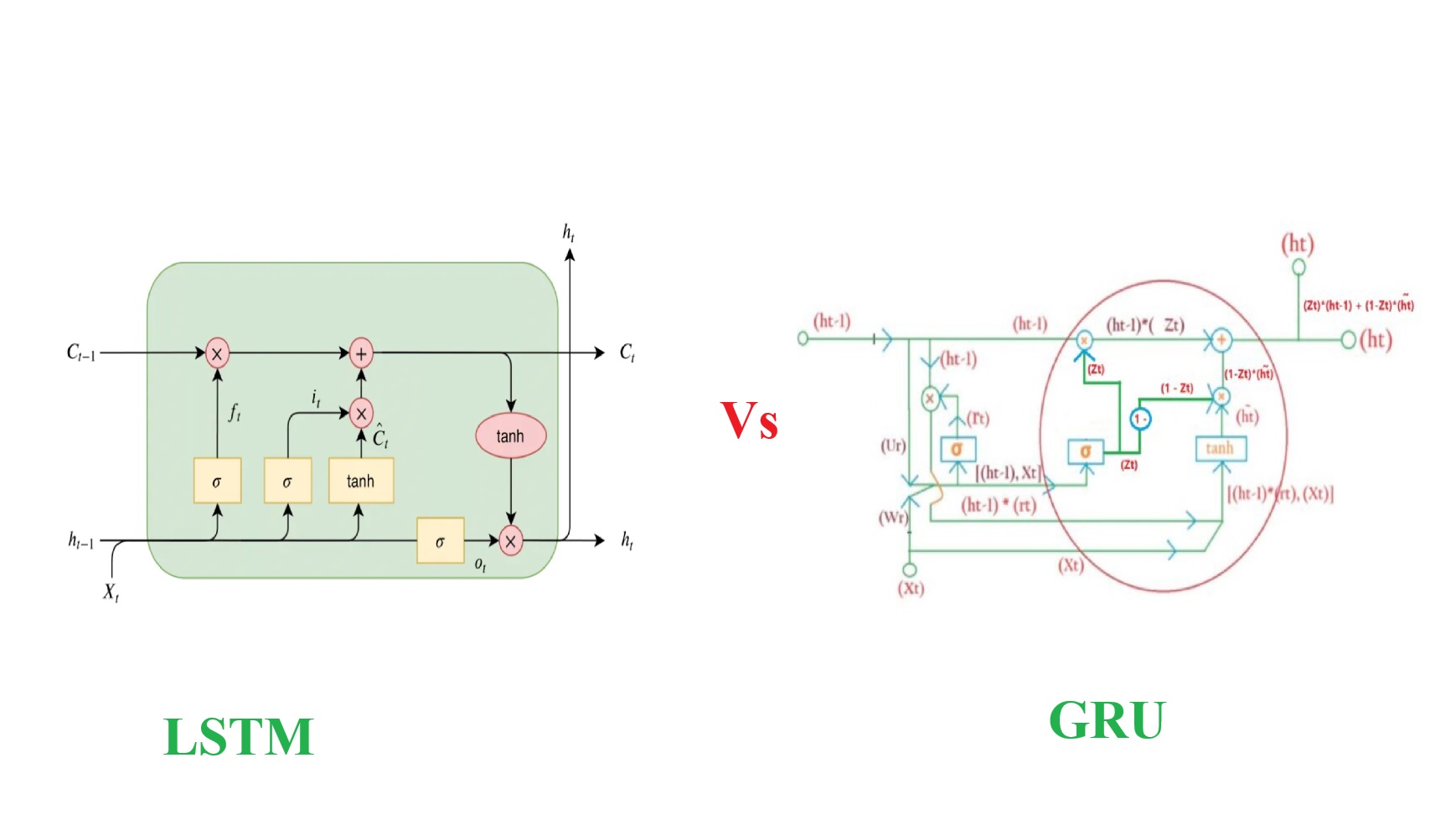
Difference Between LSTM & GRU.
Difference Between LSTM & GRU Table Of Contents: Structure and Complexity. Cell State vs. Hidden State Gating Mechanism Parameter Efficiency Performance Interpretability Use Cases Summary Table Conclusion
-
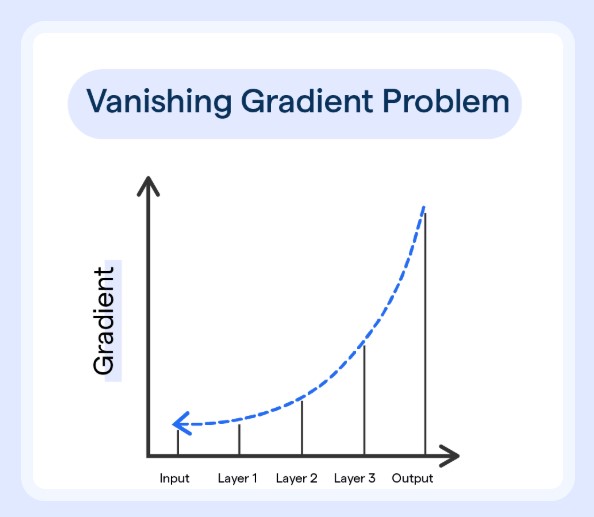
How LSTM Network Solves The Issue Of Vanishing Gradient Problem?
How Vanishing Gradient Problems Solved By The LSTM ? Table Of Contents: What Is Vanishing Gradient Problem? Why Does It Occurs In RNN? (1) What Is Vanishing Gradient Problem? The vanishing gradient problem is a challenge that occurs during the training of deep neural networks, particularly in networks with many layers. It arises when the gradients of the loss function, which are used to update the network’s weights, become extremely small as they are backpropagated through the layers of the network. This is the gradient calculation with only one layer. With only one layer you can see that three terms
-

Forward Pass Of LSTM Network.
Forward Pass Of LSTM Network Syllabus: Forward Pass In LSTM Neural Network. Answer: Forward Pass Work: Input Layer: 1st Hidden Layer: Each cell in the LSTM layer will output two values one is Cell state (Ct) and another one is hidden state (ht). This two value will be passed to the next layer as a tuple. Example:
-

What Is Backpropagation?
What Is Back Propagation Syllabus: What Is Backpropagation? Steps Of Backpropagation. Math’s In Backpropagation. (1) What Is Backpropagation? Backpropagation, short for backward propagation of errors, is a supervised learning algorithm used to train artificial neural networks. It adjusts the weights of the network to minimize the error between the predicted outputs and the actual target values. Here’s how it works: (2) Steps Of Backpropagation (3) Math’s Behind Backpropagation Forward Propagation: Loss Calculation: Back Propagation:
-

RNN – All Doubts Answers!
RNN – All Doubts Answers! Syllabus: Explain Me The Embedding LAYER. RNN One To One Architecture RNN One To Many Architecture RNN Many To One Architecture RNN Many To Many Architecture how in case of One-to-One Architecture input_length can be 5 but not in one to many processes the sequence as a whole. and entire input sequence step by step (or token by token). what is the difference Architecture of Recurrent Neural Network (RNN) Why RNN Uses Same Weights For Every Words? Super Note: The RNN architecture depends on how it takes input and produces output. In One-To-One architecture
