-

How To Sort A Numpy Array ?
How To Sort A Numpy Array? Table Of Contents: np.sort( ) Examples Of Sorting Numpy Array. (1) np.sort( ) Return a sorted copy of an array. Syntax: numpy.sort(a, axis=-1, kind=None, order=None) Parameters: a: array_like – Array to be sorted. axis: int or None, optional – Axis along which to sort. If None, the array is flattened before sorting. The default is -1, which sorts along the last axis. kind: {‘quicksort’, ‘mergesort’, ‘heapsort’, ‘stable’}, optional – Sorting algorithm. The default is ‘quicksort’. order: str or list of str, optional – When a is an array with fields defined, this argument specifies which fields to
-

How To Add Numpy Arrays ?
How To Add Numpy Arrays ? Table Of Contents: ‘+’ Operator np.concatenate() (1) ‘+’ Operator The ‘+’ operator will ‘sum’ the elements of numpy array. Example-1 a = np.array([1,2,3,4,5]) b = np.array([6,7,8,9,10]) a + b Output: array([ 7, 9, 11, 13, 15]) Example-2 a = np.array([1,2,3,4,5]) b = np.array([6,7,8,9,10]) c = np.array([11,12,13,14,15]) a + b + c Output: array([18, 21, 24, 27, 30]) (2) np.concatenate() Join a sequence of arrays along an existing axis. Syntax: numpy.concatenate((a1, a2, …), axis=0, out=None, dtype=None, casting="same_kind") Parameters: a1, a2, …sequence of array_like – The arrays must have the same shape, except in the dimension
-
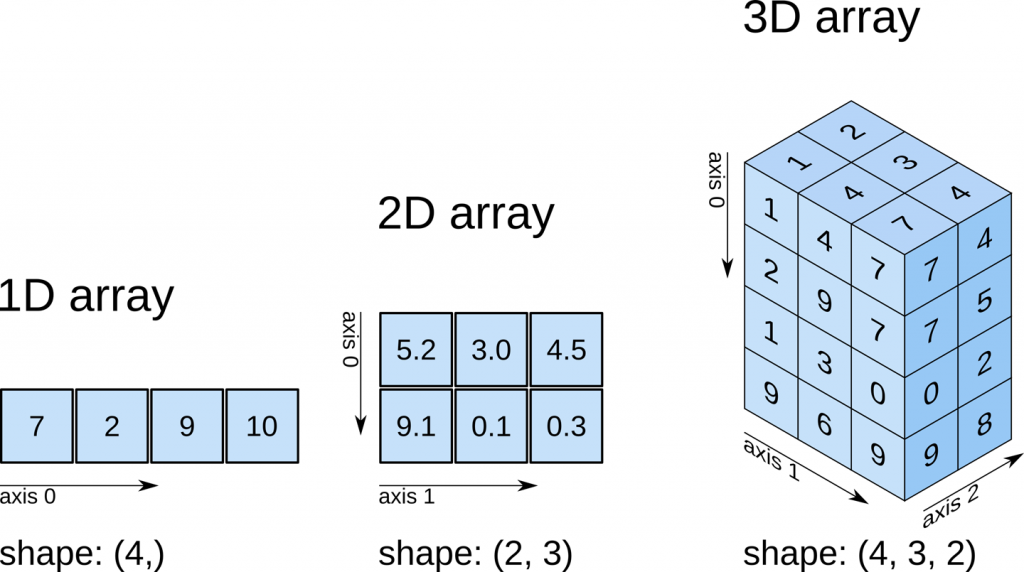
How To Create Numpy Array ?
How To Create Numpy Array ? Table Of Contents: np.array( ) np.zeros( ) np.ones( ) np.empty( ) np.arange( ) np.linspace( ) (1) np.array( ) To create a NumPy array, you can use the function np.array(). All you need to do to create a simple array is, pass a list to it. you can also specify the type of data in your list. Example-1 import numpy as np lst = [1,2,3,4,5,6] a = np.array(lst) a Output: array([1, 2, 3, 4, 5, 6]) (2) np.zeros( ) You can also create an array which will contain only zeros. np.zeros( ) will take an integer
-

How To Import Numpy?
How To Import Numpy? Table Of Contents: Importing Numpy Module. Example Of Using NumPy Module. (1) Importing Numpy Module. Syntax: import numpy as np (2) Example Of Using Numpy Module. a = np.arange(6) a Output: array([0, 1, 2, 3, 4, 5]) Note: An array of ‘6’ elements.
-

How To Install NumPy?
How To Install NumPy? Table Of Contents: Install Using ‘pip’. Install Using ‘conda’ (1) Install Using ‘pip’ : Recommended Syntax: pip install numpy (2) Install Using ‘conda’ Syntax: conda install numpy
-

Welcome To Numpy !!
Welcome To Numpy !! Table Of Contents: What Is NumPy? Why Use NumPy? Applications Of Numpy? (1) What Is Numpy ? ‘Numpy’ is a ‘Python’ package which is designed for performing heavy mathematical computation. If your work field is related to Science and Math then it’s your go-to library. ‘Numpy’ is based on a ‘ndarray’, This encapsulates n-dimensional arrays of homogeneous data types. (2) Why Use Numpy ? NumPy arrays are faster and more compact than Python lists. An array consumes less memory and is convenient to use. NumPy uses much less memory to store data and it provides a mechanism
-

Numpy Syllabus
Numpy Syllabus (1) Welcome to NumPy! (2) Installing NumPy (3) How to import NumPy ? (4) How to create a basic numpy array ? (5) Adding, removing, and sorting elements In A Numpy Array. (6) How do you know the shape and size of an array ? (7) How To Reshape a Numpy Array ? (8) How to convert a 1D array into a 2D array ? (9) How to create an array from existing data ? (10) Basic array operations. (11) Broadcasting an Numpy Array. (12) More useful array operations. (13) How To Create Metrices Using Numpy Array. (14)
-

Pandas DataFrame Histogram Plot.
Pandas DataFrame Histogram Plot. Table Of Contents: Syntax ‘plot.hist( )’ Method In Pandas. Examples ‘plot.hist( )’ Method. (1) Syntax: DataFrame.hist(column=None, by=None, grid=True, xlabelsize=None, xrot=None, ylabelsize=None, yrot=None, ax=None, sharex=False, sharey=False, figsize=None, layout=None, bins=10, backend=None, legend=False, **kwargs) Description: Make a histogram of the DataFrame’s columns. A histogram is a representation of the distribution of data. This function calls matplotlib.pyplot.hist(), on each series in the DataFrame, resulting in one histogram per column. Parameters: data: DataFrame – The pandas object holding the data. column: str or sequence, optional – If passed, will be used to limit data to a subset of columns. by: object, optional – If passed,
-

Pandas DataFrame Box Plot.
Pandas DataFrame Area Plot. Table Of Contents: Syntax ‘plot.boxplot( )’ Method In Pandas. Examples ‘plot.boxplot( )’ Method. (1) Syntax: DataFrame.boxplot(column=None, by=None, ax=None, fontsize=None, rot=0, grid=True, figsize=None, layout=None, return_type=None, backend=None, **kwargs) Description: Make a box plot from DataFrame columns. Make a box-and-whisker plot from DataFrame columns, optionally grouped by some other columns. A box plot is a method for graphically depicting groups of numerical data through their quartiles. The box extends from the Q1 to Q3 quartile values of the data, with a line at the median (Q2). The whiskers extend from the edges of box to show the range of
-

Pandas DataFrame Scatter Plot.
Pandas DataFrame Scatter Plot Table Of Contents: Syntax ‘plot.scatter( )’ Method In Pandas. Examples ‘plot.scatter( )’ Method. (1) Syntax: DataFrame.plot.scatter(x, y, s=None, c=None, **kwargs) Description: Create a scatter plot with varying marker point size and color. The coordinates of each point are defined by two dataframe columns and filled circles are used to represent each point. This kind of plot is useful to see complex correlations between two variables. Points could be for instance natural 2D coordinates like longitude and latitude in a map or, in general, any pair of metrics that can be plotted against each other. Parameters: x:
